
Personalizing Mobile App Content with Bloomreach
Why this matters
Modern loyalty programs live or die by relevance.
By combining TRIFFT Mobile App with Bloomreach In-App Personalization, marketers can control who sees what content inside the mobile app — without deploying new app versions or changing backend logic.
This setup allows you to:
- Personalize app content by audience, behavior, or lifecycle stage
- Reuse Bloomreach segmentation and campaign logic inside the mobile app
- Run visually rich, custom-designed campaigns (not just static banners)
- Keep placement and layout stable, while content and targeting stay flexible
A common use case is custom-designed stamp or challenge campaigns, where:
- Transaction and loyalty events are sent from TRIFFT to Bloomreach
- Bloomreach evaluates audience eligibility
- Each member sees a different card or message inside the mobile app homepage
What this use case covers
This guide explains how to:
- Place a Bloomreach-powered content block inside the TRIFFT Mobile App
- Connect that placement to a Bloomreach In-App campaign using a shared Placeholder ID
- Let Bloomreach fully control targeting, timing, and content variants
Prerequisites
Before you start, make sure the following is in place:
Required integrations
- Bloomreach integration connected and actively syncing with TRIFFT
- Event and profile data flowing from TRIFFT to Bloomreach
Mobile app requirements
- TRIFFT Mobile App enabled
- Mobile App version 2.1.5 or higher
Permissions
- Access to:
- TRIFFT Admin (Mobile App / Touchpoints settings)
- Bloomreach Campaigns & In-App Personalization
High-level flow
- Create a content placeholder in the TRIFFT Mobile App
- Assign a Placeholder ID
- Create an In-App campaign in Bloomreach
- Use the same Placeholder ID in Bloomreach
- Control audience, timing, and content entirely from Bloomreach
Step 1: Add a Bloomreach block in TRIFFT
In TRIFFT Admin, navigate to:
Settings → Touchpoints → Mobile App → Homepage
(or any dynamically built page)
Add a Bloomreach content block to the page.
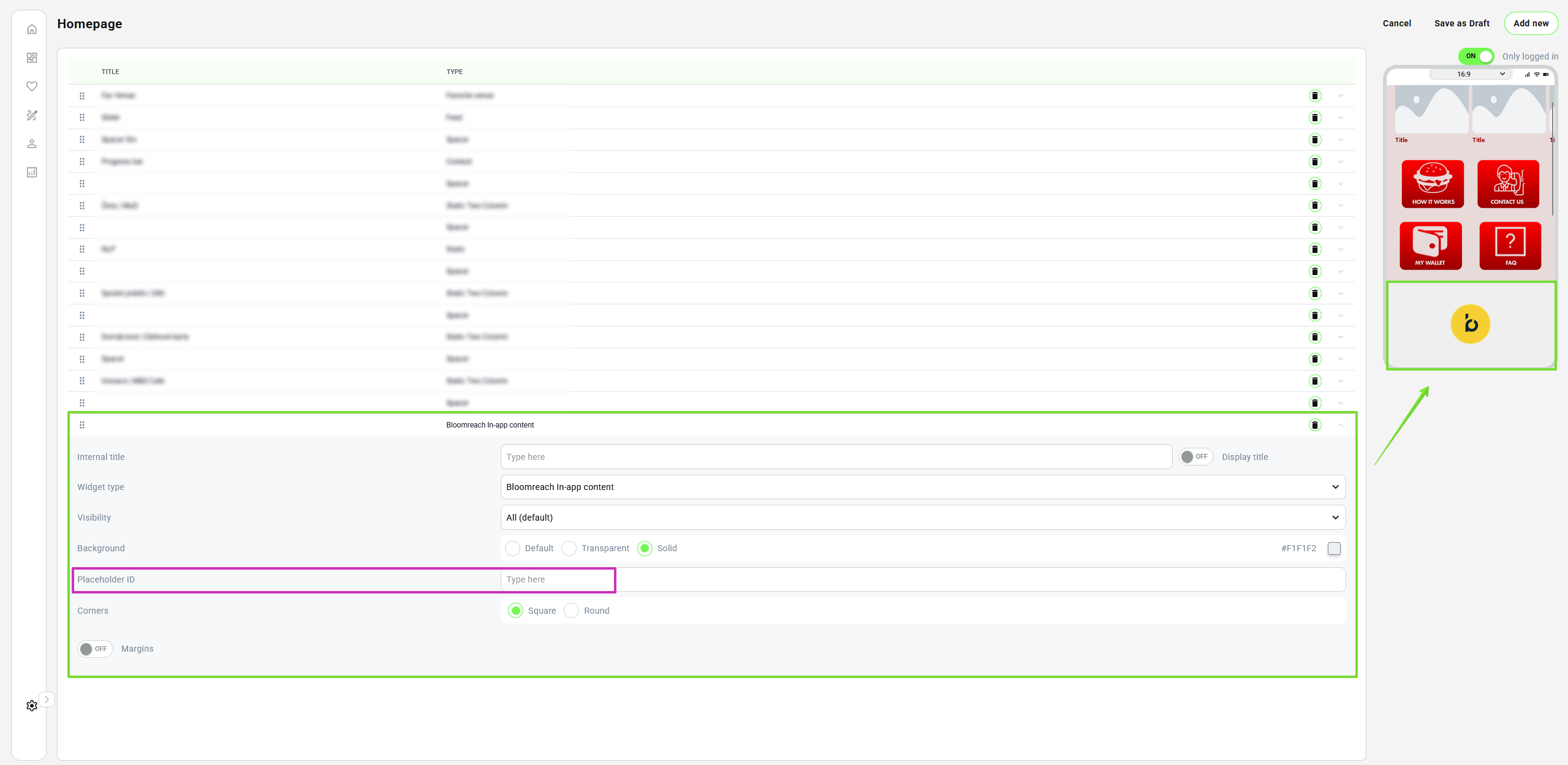
Add a BR in-app widget in Trifft
Configure visual options such as:
- Corner style (square / rounded)
- Margins (on / off)
- Spacing relative to other blocks
These settings control layout only — not personalization.
Placeholder ID (important)
Set the Placeholder ID for this block.
This ID is the connection point between TRIFFT and Bloomreach.
Example:
You will use this exact ID again in Bloomreach.
Step 2: Create an In-App campaign in Bloomreach
In Bloomreach, go to:
Campaigns → In-App Personalization
Create a new campaign and choose your desired content type and design.
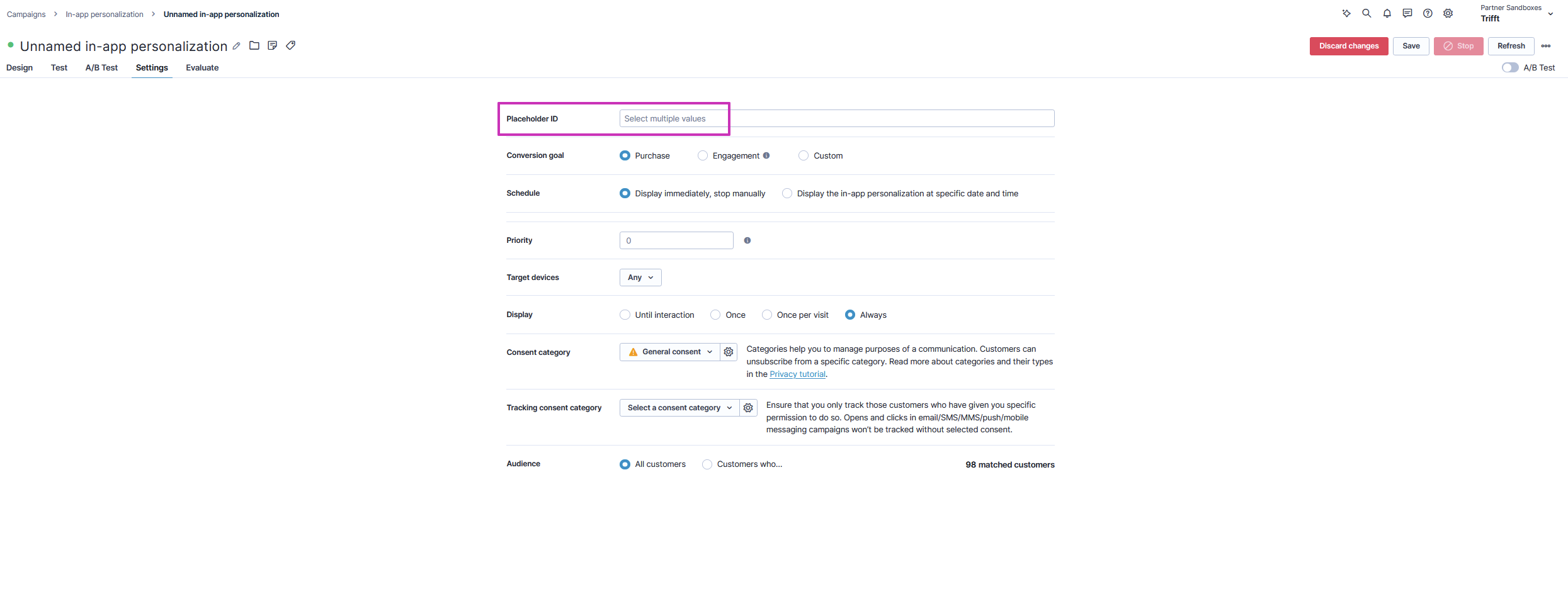
In-App Personalization in Bloomreach
Campaign configuration essentials
Make sure to configure:
- Placement / Placeholder ID
- Must exactly match the Placeholder ID used in TRIFFT
- Audience
- Use Bloomreach segmentation logic (events, attributes, lifecycle stages)
- Display rules
- When the content is eligible to load
- Category or contextual constraints (if applicable)
Bloomreach fully controls:
- Who sees the content
- Which variant they see
- When it is eligible to appear
Step 3: Match Placeholder IDs
This step is critical.
- TRIFFT block Placeholder ID
must match - Bloomreach campaign Placeholder ID
If they do not match, no content will render.
There is no fallback content.
Step 4: Test in the mobile app
Open the mobile app and navigate to the page where the block is placed.
Notes:
- Content loads after page load
- It is not pushed or animated like native TRIFFT messages
- A short delay is expected and normal
If nothing appears:
- Check Placeholder ID spelling
- Confirm the user belongs to the Bloomreach audience
- Verify the campaign is active
Example use case: Custom stamp campaign
One proven scenario uses this setup for custom-designed stamp or challenge campaigns:
- TRIFFT sends purchase and engagement events to Bloomreach
- Bloomreach evaluates progress and eligibility
- Each member sees a different card design or message
- The mobile app layout stays unchanged
This allows highly tailored campaigns without rebuilding app UI or logic.
Key limitations to be aware of
- Content is not proactively pushed
- No real-time guarantees on load timing
- All targeting logic lives in Bloomreach
- TRIFFT controls placement, not personalization logic
This separation is intentional and keeps responsibilities clean.
Summary
Using Bloomreach with the TRIFFT Mobile App enables:
- True audience-driven personalization
- Centralized campaign management for marketers
- Flexible, design-rich in-app experiences
- No app redeployments for content changes
Once the placeholder is in place, Bloomreach does the rest.