
Zonal POS Loyalty Integration
This guide explains how Zonal EPOS (Aztec / iZone) integrates with the TRIFFT Loyalty Platform, how the checkout flow works, and how the integration is configured.
Overview
TRIFFT integrates with Zonal EPOS (Aztec / iZone) by replacing Zonal's internal loyalty engine using the iZone Loyalty Plugin model.
In this setup, Zonal POS sends loyalty requests directly to TRIFFT. TRIFFT responds in real time for reward validation and redemption, and processes transactions asynchronously after receipt closure.
This enables:
- Real-time member identification at checkout
- Immediate reward redemption and reversal
- Post-transaction points accrual
Integration Model & Data Flow
Zonal supports two loyalty integration approaches:
- iZone Loyalty Plugin (internal loyalty engine override)
- Newly-developed Zonal Loyalty API (integration also available from TRIFFT)
This documentation refers to the iZone Loyalty Plugin.
The Zonal POS is configured to route loyalty calls to TRIFFT instead of its native loyalty service.
From the operator’s perspective, the experience remains fully native. All loyalty interactions behave as standard Zonal functionality, with TRIFFT transparently managing validation and redemption in real time
High-Level Flow
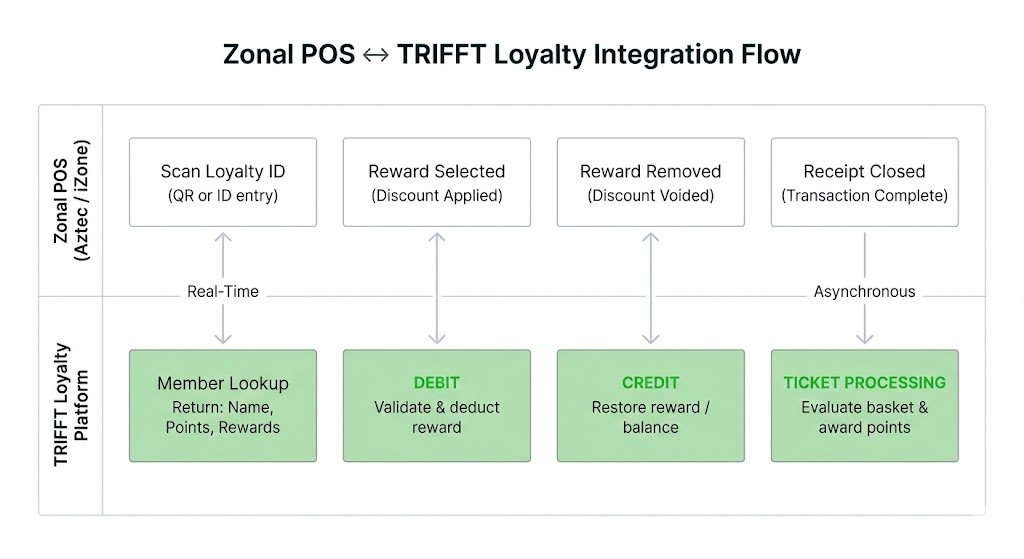
- Operator scans loyalty QR code or enters loyalty ID at POS
- POS sends balance request to TRIFFT
- TRIFFT returns:
- Member name
- Loyalty program
- Points balance
- Available rewards
- Operator selects reward
- POS sends Debit → TRIFFT deducts reward/balance
- If reward is removed
- POS sends Credit → TRIFFT restores reward/balance
- Receipt is paid and closed
- POS sends Ticket (including item data)
- TRIFFT evaluates earning rules and awards points
3. Configuration
3.1 Zonal POS Configuration
In Zonal POS project settings, the administrator must override the loyalty server.
Navigate to:
POS → iZone Server Override URL
Set override URL to:
https://api.trifftloyalty.com/zonal/v1
Within Loyalty Legacy configuration:
- Username = Venue ID (Aztec ID)
- Password = TRIFFT API Key
- One API key may be shared across venues within a project
Once configured, all loyalty calls are routed to TRIFFT.
3.2 TRIFFT Configuration
Each venue must:
- Exist under Settings → Locations
- Have the correct Aztec Venue ID stored (this must match the Zonal Venue ID configured at POS).
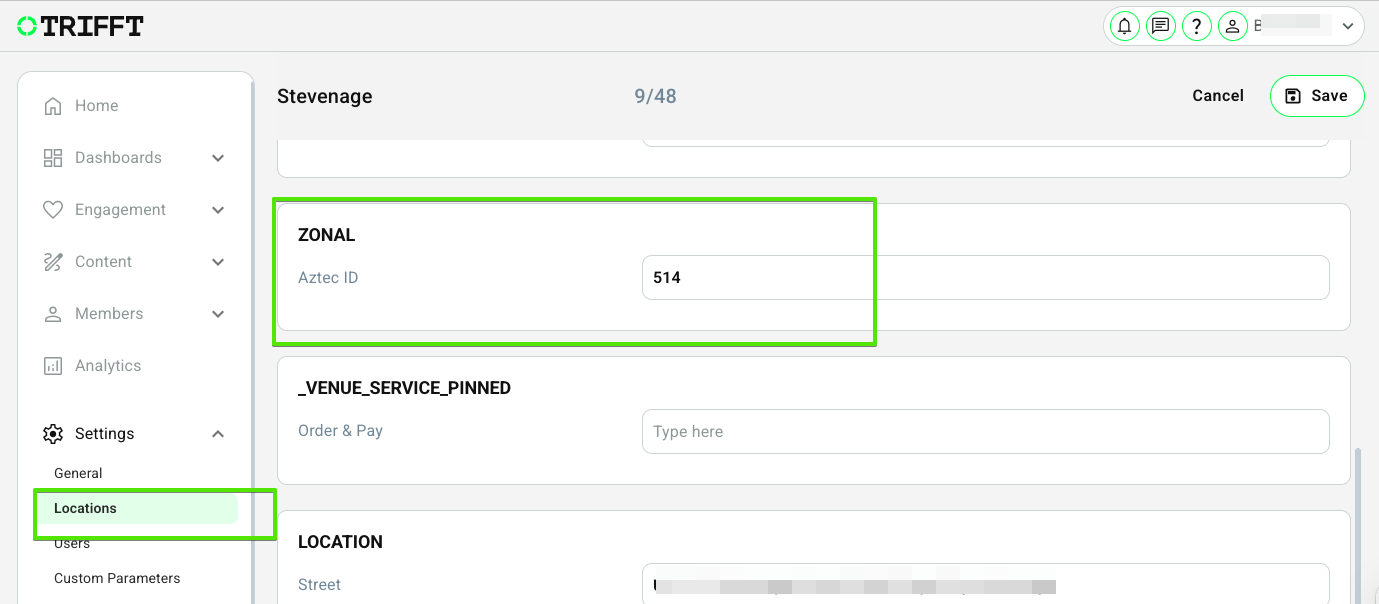
Set the slug of the custom parameter to: aztecVenueId
4. Scope & Limitations
Supported:
- Real-time member lookup
- Points redemption
- Coupon redemption
- Reward reversal
- Points accrual
- Multi-venue setups
Not supported:
- POS-based member registration
Members must already exist in TRIFFT before redemption.