
Klaviyo Set Up
This Technical Setup Guide provides the configuration steps required to initialize and manage the Klaviyo native integration within the TRIFFT.
Prerequisites
Administrator access required — You need sufficient permissions in both TRIFFT and Klaviyo to install the integration, authorize data access, create API keys, and configure flows.
Before you begin, gather the following:
| Requirement | Details |
|---|---|
| TRIFFT project | An active TRIFFT project with members and the relevant loyalty mechanics configured. |
| Klaviyo account | An active Klaviyo account where the TRIFFT integration will be installed. |
| Permissions | Access to Settings → Integrations in TRIFFT and integration/flow administration in Klaviyo. |
| Member identity | Verified members must have a usable primary contact and a consistent identifier between both platforms. |
| Test member | A test profile that exists in both TRIFFT and Klaviyo. |
| TRIFFT API key | Required only when Klaviyo flows need to call TRIFFT APIs. |
| Klaviyo private API key | Required only for custom outbound webhooks from TRIFFT to Klaviyo. |
Step-by-step installation
The integration can be initiated either from TRIFFT or from the Klaviyo integration directory.
Option A: Install from TRIFFT
- Log in to the TRIFFT administration interface.
- Navigate to Settings → Integrations → Klaviyo.
- Click Install in the top-right corner.
- Log in to Klaviyo if required.
- Select or confirm the Klaviyo account that should be connected.
- Review the requested permissions and allow TRIFFT to access the account.
- Complete the authorization and return to TRIFFT.
Option B: Install from Klaviyo
-
In Klaviyo, open Integrations.
-
Click Add Integration and search for TRIFFT.
-
Click Add App.
-
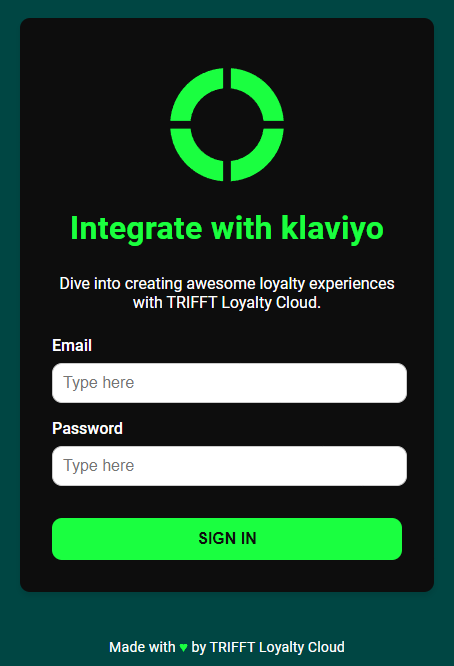
Log in if required.
-
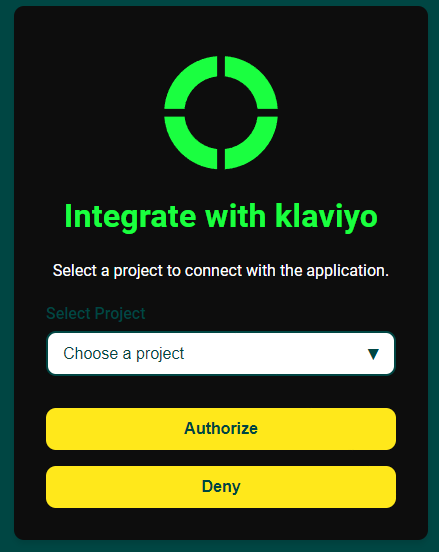
Select the TRIFFT project you want to connect.
-
Click Authorize.
-
Review and allow the requested Klaviyo permissions.
-
You will be redirected to TRIFFT to finish the configuration.
One TRIFFT project should be connected to the intended Klaviyo account. Confirm the selected project and account before authorizing the integration.
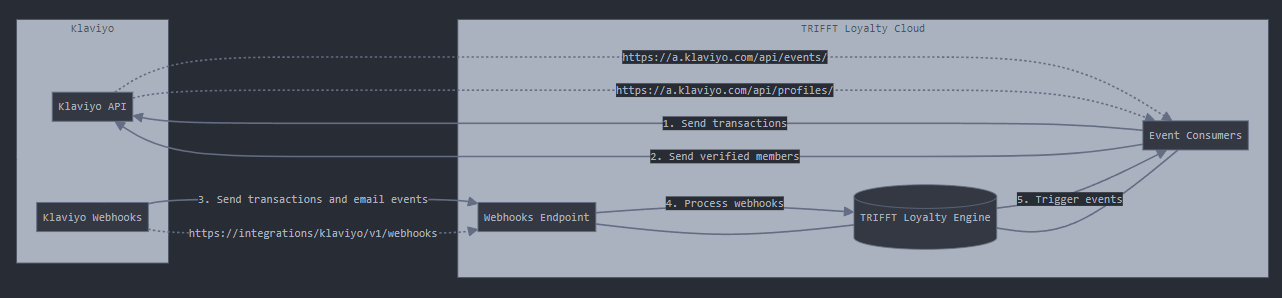
Architectural Diagram
What starts syncing after installation
The standard integration continuously synchronizes verified TRIFFT members and loyalty activity to Klaviyo.
Core behavior includes:
- Verified registered members are created or updated as Klaviyo profiles.
- Transactions received by TRIFFT are shared with Klaviyo as transaction events.
- Loyalty events are shared as Klaviyo metrics.
- Standard profile properties and project-specific Custom Parameters are refreshed when TRIFFT sends a standard event.
A member who has not completed the required verification may not behave like a fully synchronized loyalty profile. Verification can depend on the implementation, for example email confirmation, SMS or email OTP, mobile-app registration, Client Zone registration, Shopify account creation, or WooCommerce loyalty registration.
Standard events sent to Klaviyo
Whenever TRIFFT is connected to Klaviyo, the integration works by continuously synchronizing data from TRIFFT members to Klaviyo profiles. This includes both Customer events (such as purchases or redemptions) and Custom profile properties (like points balance, membership tier, or consent status). Every time a standard TRIFFT event is sent to Klaviyo, it also updates the full customer profile with the most current data—ensuring that Klaviyo always reflects the latest state of the member.
Overview: What TRIFFT Shares with Klaviyo
By default, TRIFFT shares 15 metrics and enriches 13 profile attributes in Klaviyo.
This enables advanced segmentation, precise automation, and personalized campaigns.
Metrics Shared
✅ Member verified
✅ Coupon assigned
✅ Coupon activated
✅ Coupon redeemed
✅ Transaction created -> Is processed as transaction event by Klaviyo, not as standard event
✅ Wallet credited
✅ Wallet debited
✅ Profile updated
✅ App opened
✅ Favorite venue changed
✅ Added to segment
✅ Removed from segment
✅ Language changed
✅ Referral code provided
✅ Referral invited
✅ Referral reward awarded
✅ Promotion Participated
Attributes Enriched
✅ Locale – User's preferred language
✅ External ID – TRIFFT member UUID
✅ trifft_available_coupons – Number of active coupons
✅ trifft_coupons – List of all assigned coupons
✅ trifft_fav_location_id – UUID of favorite venue
✅ trifft_fav_location_name – Name of favorite venue
✅ trifft_id – TRIFFT member UUID
✅ trifft_points – Loyalty point balance
✅ trifft_primary_card_id – Primary card ID
✅ trifft_segments – Current segment membership (slugs)
✅ trifft_support_id – Support/referral ID
✅ trifft_tier – Current tier (e.g. Bronze, Silver, Gold)
✅ Custom Parameters – All member-specific parameters (e.g. first_name, last_name, date_of_birth, etc.)
For a complete breakdown of payloads and how to use these in flows or segmentation, continue reading below.
Events sent to Klaviyo
| Metric Name | Sample Payload | Note |
|---|---|---|
| Member verified | {"id": "bf428af0-bf06-4bc4-a91b-91b5bda6e211"} | TRIFFT member UUID is passed on |
| Coupon assigned | {"id": "fa89ef32-1420-4fcd-b23a-e9478706dba9", "name": "Welcome!", "coupon": {"id": "fa89ef32-1420-4fcd-b23a-e9478706dba9", "name": "Welcome to Club Frog!", "description": "Bienvenue au Club.", "image_logo": "https://cdn.trifft.io/files/abc.png", "image_card": "https://cdn.trifft.io/files/def.png", "type": "GENERAL", "points": null, "is_enabled": true, "is_pinned": true, "created_at": 1723125758, "updated_at": 1744814400}} | When coupon is assigned to member (typically via API or contest). Full coupon info is bundled. |
| Coupon activated | {"id": "fa89ef32-1420-4fcd-b23a-e9478706dba9", "name": "Welcome!", "coupon": {"id": "fa89ef32-1420-4fcd-b23a-e9478706dba9", "name": "Welcome to Club Frog!", "description": "Bienvenue au Club.", "image_logo": "https://cdn.trifft.io/files/abc.png", "image_card": "https://cdn.trifft.io/files/def.png", "type": "GENERAL", "points": null, "is_enabled": true, "is_pinned": true, "created_at": 1723125758, "updated_at": 1744814400}} | When member activates coupon. Full coupon info is bundled. |
| Coupon redeemed | {"id": "ab2bc143-e3f7-463d-b5ae-af7cc6ee0872", "name": "£10 off your next order. (Minimum spend £20)", "coupon": {"id": "ab2bc143-e3f7-463d-b5ae-af7cc6ee0872", "name": "£10 off your next order. (Minimum spend £20)", "description": "Click the button below to activate your **£10 voucher**. Valid on purchases with a **minimum spend of £20**.", "image_logo": "https://cdn.trifft.io/files/abc.png", "image_card": "https://cdn.trifft.io/files/def.png", "type": "GENERAL", "points": 20000, "is_enabled": true, "is_pinned": false, "created_at": 1734439218, "updated_at": 1742477134}} | When member redeems coupon |
| Transaction created | {"id": "fc55bed2-471c-42a4-807d-994664439d1e", "transaction_id": "T-1137073931", "type": "standard", "note": null, "items": [{"name": "PINT - PARADISE IPA", "type": "S", "price": 5.5, "qty": 1, "sku": "1002722495", "points": null, "note": null}], "venue": {"id": "06d27d15-7867-4412-8a81-aaf9b23af497", "name": "The Frog & Rosbif, Toulouse", "logo": "https://cdn.trifft.io/files/abc.png", "currency": "EUR", "address": {"id": "1ef4d7ca-1cf8-6634-a567-c9fe5c38cade", "street": "Toulouse 14 rue de l'Industrie", "city": "TOULOUSE", "postal_code": "31000", "country": "France", "lat": "43.60502235", "lng": "1.45124591"}, "is_enabled": true, "created_at": 1722238315, "updated_at": 1724947007}, "venue_id": "06d27d15-7867-4412-8a81-aaf9b23af497", "venue_name": "The Frog & Rosbif, Toulouse", "$value_currency": "EUR", "$value": 5.5} | Full item details and venue detail is provided |
| Wallet credited | {"wallet_id": "a79c2086-b157-431a-9bb0-d40884e3994b", "points": 12.23, "note": null, "transaction_id": "0eea095a-f7e3-4dd4-a469-b460173ff4f6", "wallet": {"id": "a79c2086-b157-431a-9bb0-d40884e3994b", "name": "Points", "is_primary": true, "type": "POINTS", "currency": "POINTS", "suffix": "p", "prefix": null, "points": 261779, "created_at": 1738147448, "updated_at": 1746713670}, "$value": 12.23} | All wallet details are bundled. Note can be instrumental in understanding the sources of wallet balance change. |
| Wallet debited | {"wallet_id": "a79c2086-b157-431a-9bb0-d40884e3994b", "points": 12.23, "note": null, "wallet": {"id": "a79c2086-b157-431a-9bb0-d40884e3994b", "name": "Points", "is_primary": true, "type": "POINTS", "currency": "POINTS", "suffix": "p", "prefix": null, "points": 260556, "created_at": 1738147448, "updated_at": 1746717142}} | All wallet details are bundled. Note can be instrumental in understanding the sources of wallet balance change. |
| Profile updated | {"dateOfBirth": "1997-06-14", "first_name": "Jane", "language": "fr", "last_name": "Doe", "klaviyoID": "01JV2WKTRC6ASGAHX559J2T8AR"} | All project-specific custom parameters are always passed on. Triggered also when member signs/revokes consent |
| App opened | {"app_version": "2.1.5", "app_platform": "ios", "timestamp": 1747075048} | App usage tracking event |
| Favorite venue changed | {"id": "972d344b-fd01-4461-8a75-09ccf6049445", "name": "The Frog & Underground", "venue": {"id": "972d344b-fd01-4461-8a75-09ccf6049445", "name": "The Frog & Underground", "logo": "https://cdn.trifft.io/files/66ababa3890ce605287920.png", "currency": "EUR", "address": {"id": "1ef4d81b-35c6-6af2-952f-29eb98eeb785", "street": "The Frog & Underground 176 rue Montmartre", "city": "PARIS", "postal_code": "75002", "country": "France", "lat": "48.87115850", "lng": "2.34315221"}, "is_enabled": true, "created_at": 1722240492, "updated_at": 1731945323}} | Full venue info is bundled |
| Added to segment | {"id": "63a6862c-3075-4364-8bc2-254b24b3321f", "name": "Students", "slug": "custom-students", "type": "CUSTOM"} | System segments like "All members" are ignored |
| Removed from segment | {"id": "63a6862c-3075-4364-8bc2-254b24b3321f", "name": "Students", "slug": "custom-students", "type": "CUSTOM"} | System segments like "All members" are ignored |
| Language changed | {"language": "en"} | When member changes language (typically in mobile app) |
| Referral code provided | {"referrer_email": "[email protected]", "referrer_code": "6B8CVO", "referrer_klaviyo_id": "01JT091FZ6C22QVP2T19TN26YB", "referrer_name": "Jane Doe"} | This event appears to person who received the referral invite |
| Referral invited | {"email": "[email protected]", "referral_code": "GW5OHL", "referral_klaviyo_id": "01JTMRPX53BA3SZEA89K4XNYDQ"} | This event appears to person who sent the referral invite |
| Promotion Participated | {"promotion_type": "SPEND_THRESHOLD_COUPON", "awarded_points": null, "awarded_coupons_count": 1, "promotion_id": "d5b3cdde-4d5d-49f9-801a-990ef7d77840", "awarded_coupons": [{"coupon_id": "d49fc460-124a-4264-a19b-6389a5955719", "user_coupon_id": "1f0d5ee1-37ed-669a-be7f-79a95be1a103", "coupon_name": "£10 off your next order"}], "promotion_name": "Earn £10 for every £100"} | When a person takes part in a promo campaign |
Sending additional events / custom structure or payload of events
If the above events do not cover your needs, leverage TRIFFT's webhook functionality to share any of the long list of events.
Attributes sent to Klaviyo
Default attributes shared by all TRIFFT projects
| Attribute Name | Example Value | Note |
|---|---|---|
| Locale | fr | User's preferred language |
| External ID | 0864e6af-c637-4274-996a-08069064d9b7 | TRIFFT member UUID |
| trifft_available_coupons | 6 | Number of active coupons |
| trifft_coupons | [{"id": "0e7d479d-e92f-4d5d-9e46-a369ae643895", "name": "Rare Beauty $10", "img_logo": "https://cdn.trifft.io/files/6807f97b5188a781249465.png", "valid_from": 1724251806, "valid_until": null, "expiration_at": null, "points": 1500}] | Full list of coupons |
| trifft_fav_location_id | fae2fb65-5211-4ffa-b3bb-d53d75231657 | TRIFFT UUID of favorite location |
| trifft_fav_location_name | The Frog & British Library | Name of favorite venue |
| trifft_id | 15ab74f3-d9ba-41cf-8963-344e99381235 | TRIFFT member UUID |
| trifft_points | 0 | Points on TRIFFT primary wallet |
| trifft_primary_card_id | 9990000412006 | Primary card ID |
| trifft_segments | ["internal-registered-members", "custom-public-football-3691"] | Segment membership list - uses TRIFFT segment slugs |
| trifft_support_id | 74YFVF | Customer support ID (also used as Referral ID) |
Attributes shared when Tiers are enabled
| Attribute Name | Example Value | Note |
|---|---|---|
| trifft_tier | Bronze | Member's tier/level |
Additional project-specific attributes shared
All member custom parameters (e.g. first name, last name, date of birth etc) are shared to Klaviyo.
Validate the standard data flow
1. Confirm the member profile
- Create or select a verified test member in TRIFFT.
- Open the corresponding profile in Klaviyo.
- Confirm that the profile contains a TRIFFT member identifier such as External ID or trifft_id.
- Check that available loyalty properties such as points, coupons, segments, locale, and tier are present.
2. Trigger a standard event
Use one of the following test actions:
- Create a verified member.
- Add points to the member's primary wallet.
- Assign a coupon.
- Create a test transaction.
- Update a member profile field.
3. Confirm the event in Klaviyo
- Open Analytics → Metrics in Klaviyo.
- Find the relevant TRIFFT metric.
- Open the test profile and confirm that the event appears in the activity history.
- Inspect the event payload and verify that the member and event values are correct.
- Confirm that the latest profile properties were refreshed.
Configure a pre-built loyalty flow
TRIFFT provides ready-to-use Klaviyo flow templates that can be copied and customized.
Loyalty Program Welcome Flow
The welcome flow is triggered by the Member verified event and contains three sequential emails:
- Welcome and Program Introduction — Introduces the loyalty program and membership benefits.
- Ways to Earn — Explains how members can earn points beyond purchases.
- Ways to Redeem — Shows how to use points and can display current coupons or rewards.
Dynamic content can include:
- Current points balance.
- Current tier.
- Active coupons.
- Program earning rules.
- Redemption rules and exchange rate.
- Referral, review, profile-completion, or preference-sharing opportunities.
To configure the flow:
- Open the Klaviyo Flow Library and locate the TRIFFT loyalty welcome template.
- Copy the flow into your Klaviyo account.
- Review every email and content block.
- Replace generic program names, reward examples, buttons, and URLs.
- Add a test-only trigger filter before activation.
- Trigger Member verified for the test member.
- Confirm that all dynamic loyalty values render correctly.
- Remove the test restriction only after validation.
Pre-built flow content is a starting point. Review every message, button, link, delay, filter, and reward description before changing the flow to Live.
Points Expiration Reminder Flow
Before enabling the expiration flow:
- Enable point expiration on the primary TRIFFT wallet.
- Confirm that the Points expiration reminder sent metric is visible in Klaviyo. Older implementations or technical payloads may refer to the underlying event as
wallet_points_expiration. - Copy the Points Expiration Reminder template from the Flow Library.
- Customize the messages and redemption links.
- Test each relevant timing scenario.
TRIFFT evaluates point expiration daily at 01:00 UTC and sends predefined reminders on:
- 30 days before expiration.
- 14 days before expiration.
- 3 days before expiration.
- 1 day before expiration.
- The day of expiration (
0).
The event can include:
| Event Property | Description |
|---|---|
| points_to_expire | Number of points scheduled to expire. |
| days_to_expire | Number of days until expiration; 0 represents the expiration day. |
| expiring_at | Expiration timestamp. |
| wallet_id | ID of the primary wallet. |
Configure Klaviyo to call TRIFFT
Use this setup when a Klaviyo flow should execute a loyalty action in TRIFFT.
1. Create a TRIFFT API key
- In TRIFFT, open Settings → API Keys.
- Create an API key with only the permissions required by the flow.
- Store the key securely.
2. Add a webhook action in Klaviyo
- Open an existing Klaviyo flow or create a new one.
- Select the event or audience trigger.
- Add a Webhook action.
- Configure the action:
| Setting | Value |
|---|---|
| Method | POST |
| Destination URL | https://api.trifft.io/v1/batch |
| Header | Authorization: Bearer YOUR_TRIFFT_API_KEY |
| Content type | application/json |
Why the Batch API is used
Klaviyo webhook URLs do not support inserting Jinja variables directly into the URL. The TRIFFT Batch API acts as a wrapper: the destination URL remains static, while member-specific IDs and endpoint paths are provided inside the JSON payload.
Variable formatting
Use spaces inside Klaviyo template braces:
{{ person.id }}Do not use:
{{person.id}}Before activating the flow, preview the webhook for a test profile and confirm that the member identifier resolves to the TRIFFT member UUID expected by the API. The profile should contain the synchronized TRIFFT identifier, such as External ID or trifft_id.
Example: assign a coupon
[
  {
    "uri": "/v1/member/{{ person.id }}/coupon/COUPON_ID/assign",
    "method": "POST",
    "payload": {}
  }
]
Example: add points
[
  {
    "uri": "/v1/member/{{ person.id }}/wallet/add",
    "method": "POST",
    "payload": {
      "points": 100,
      "note": "Klaviyo flow reward",
      "timestamp": null
    }
  }
]Confirm the unit used by the selected wallet and API endpoint. Some implementations store values in minor units or apply project-specific conversion rules.
Example: update segments, assign a reward, and send an app message
[
  {
    "uri": "/v1/segment/TARGET_SEGMENT_ID/add-members",
    "method": "POST",
    "payload": {
      "members": ["{{ person.id }}"]
    }
  },
  {
    "uri": "/v1/segment/PREVIOUS_SEGMENT_ID/remove-members",
    "method": "POST",
    "payload": {
      "members": ["{{ person.id }}"]
    }
  },
  {
    "uri": "/v1/member/{{ person.id }}/coupon/COUPON_ID/assign",
    "method": "POST",
    "payload": {}
  },
  {
    "uri": "/v1/member/{{ person.id }}/message/notification",
    "method": "POST",
    "payload": {
      "notification": {
        "title": "Reward unlocked",
        "text": "Your new loyalty reward is ready."
      },
      "link": {
        "type": "APP",
        "uri": "coupon/COUPON_ID"
      },
      "modal": null
    }
  }
]
Test a Klaviyo → TRIFFT webhook
- Open the webhook action in Klaviyo.
- Click Preview.
- Select a profile that exists in both Klaviyo and TRIFFT.
- Confirm that all template variables resolve to real values.
- Click Send Test Request.
- Confirm that Klaviyo receives an HTTP
2xxresponse. - In TRIFFT, open the member detail and inspect the member event history.
- Confirm that the intended action was performed exactly once.
If the request fails, check:
- Destination URL.
- API key and authorization header.
- JSON syntax.
- Member identifier mapping.
- Coupon, wallet, segment, or other resource IDs.
- Klaviyo webhook execution logs.
- API response body and status code.
Configuration checklist
Run through this checklist before going live:
Installation & Identity
- The correct TRIFFT project is connected to the correct Klaviyo account.
- A verified test member exists in both platforms.
- The Klaviyo profile contains the expected TRIFFT member identifier.
Standard Data
- TRIFFT metrics are visible in Analytics → Metrics.
- Standard loyalty properties are present and current.
- A test transaction, coupon, wallet, or profile event arrives successfully.
Flows
- All generic text, links, rewards, and timing have been customized.
- Flow filters prevent duplicate or unintended rewards.
- Test profiles are used before enabling a live audience.
Webhooks
- API keys use the minimum required permissions.
- Secrets are not exposed in email content or public documentation.
- Webhooks return HTTP
2xxand perform the intended action once.- Failure handling and campaign monitoring are defined.
Updated 6 days ago