
Rewards Overview
The Rewards catalog is the 'Value Exchange' of your loyalty program. It is where points turn into tangible items, experiences, or status. You will learn how to curate a catalog that motivates customers to keep engaging, ensuring that your program feels like a rewarding investment rather than just a tracking tool.
Why it matters
| Impact Area | Business Value |
|---|---|
| Revenue | Increases 'Spend-to-Reward' motivation, leading to higher transaction frequency and volume. |
| Efficiency | Automates the redemption and fulfillment process, especially for digital-only rewards, reducing operational overhead. |
| Experience | Creates high-value brand moments when customers redeem their points for a free product or exclusive experience. |
Risk if ignored — A stale or uninteresting reward catalog leads to 'Point Hoarding,' where customers accumulate points but never use them, creating a massive financial liability for the business.
Rewards are an essential feature of the point-based loyalty program, allowing customers to redeem accumulated points for various benefits. This guide provides an overview of Rewards and their purpose.
Key Features
-
Comprehensive Reward Management
- Enables the administration of all rewards offered in the loyalty program.
- Provides an organized view of available rewards and their corresponding point values.
-
Point-Based Redemption
- Customers collect points based on purchases.
- Points can be exchanged for available rewards in the system.
-
Types of Rewards
- Address: For rewards that will be sent to a specific physical address
- Contest Draw: For rewards awarded for taking part in a contest
- Digital: Non-physical rewards, such as a licenses (purely digital)
- Donations: A non-physical reward, e.g. a charity donation
- Instant: For rewards awarded to a user instantly, without any other action needed
- Pickup: For physical rewards to be collected at a specific venue
How to Use Rewards
-
Managing Rewards
- Navigate to the Rewards section to view all available rewards.
- Assign point values to each reward to define redemption requirements.
-
Redeeming Rewards
- Customers can browse the available rewards and select those they wish to redeem using their accumulated points.
- For physical rewards, users can specify a pickup location or delivery address.
-
Tracking Reward Usage
- The system provides an overview of redeemed rewards and available stock levels.
- Administrators can monitor reward trends and adjust point requirements accordingly.
Example Use Case
Scenario:A customer collected points by making purchases, and she/he would like to exchange collected points for the "Free burger" reward.
- The customer accumulated 125 points (you can see this in the top right corner).
- First 3 rewards are unlocked as the customer has enough points to redeem them.
- She/he chooses "Free burger", clicks on Select a reward, and that's it!
- How does the detail of the reward look like if you don't have enough points? The button Select a reward is still locked, as you can see on the last screenshot.
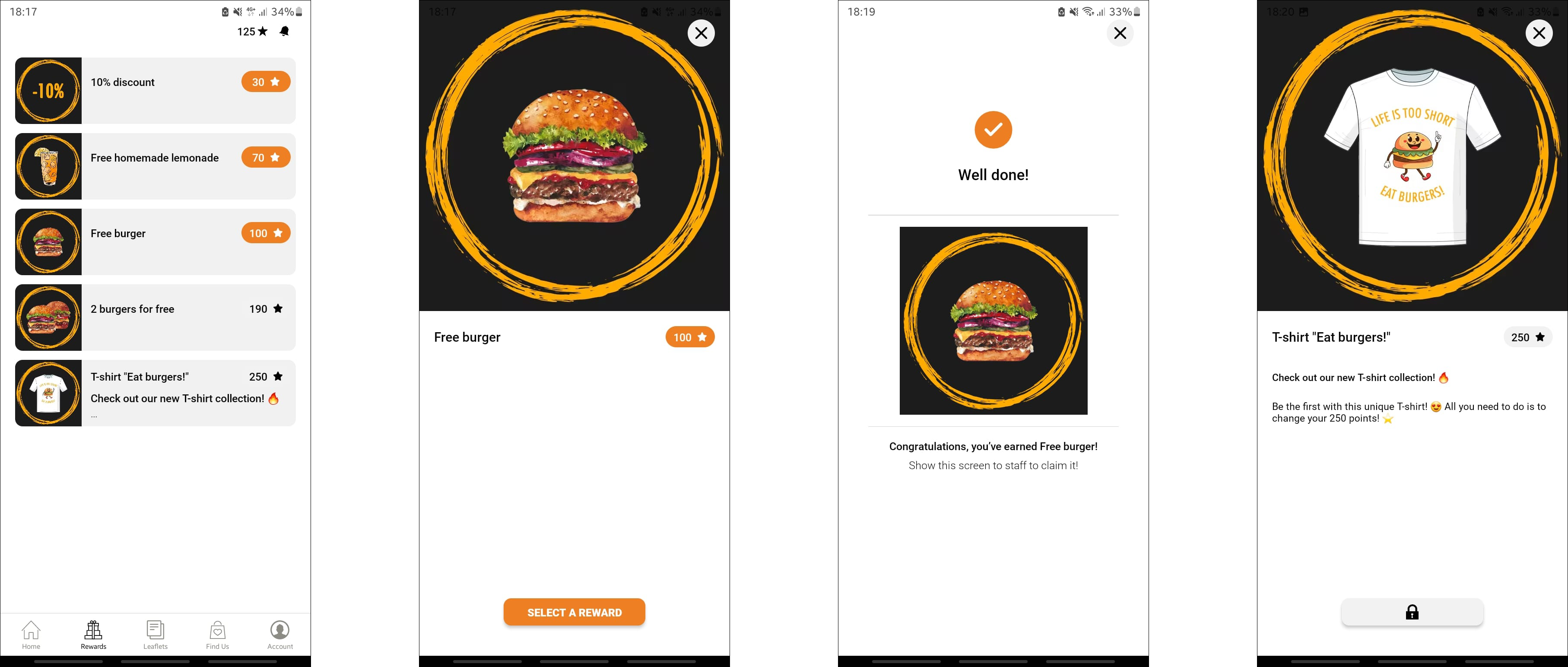
Preview of the Rewards section and the process of reward redeeming.
Example use cases
- Free Product — Redeem 500 points for a coffee or appetizer.
- Exclusive Merchandise — Use points for a limited-edition branded hoodie not available for purchase.
- Experience — Swap points for 'Early Access' to a new collection or an in-store event.
- Service Upgrades — 1,000 points for free shipping on all orders for a month.
How to measure success
Key Performance Indicators
- Primary KPI: Reward Burn Rate (Points redeemed / points issued).
- Secondary KPIs: Participation Rate and Redemption Frequency.
Governance & Operations
- Review Cadence: Weekly for the first month, then monthly.
Updated about 1 month ago