
Shopify Integration FAQ
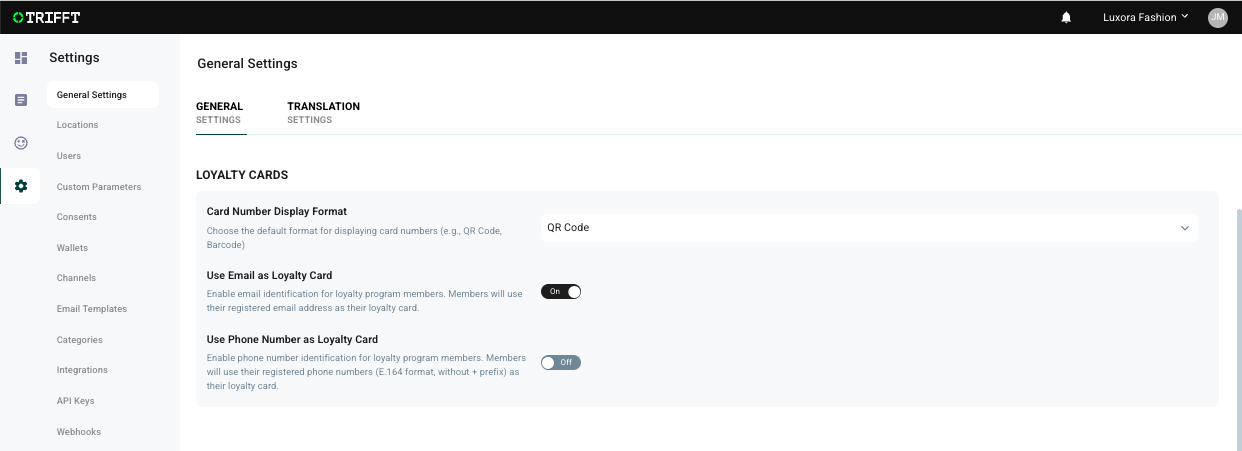
Q: How do I enable pairing of email and phone number
A: Enable "Use Email as Loyalty Card" and/or "Use Phone Number as Loyalty Card" toggles in General project settings in TRIFFT admin
Additionally, for pairing by phone number, following need to be in place:
- Phone number as custom parameter is set up in TRIFFT.
- Phone number is mapped and turned on in Shopify Integration -> Settings -> Customer mapping.
- Phone number is added to the member profile.
Phone numbers currently need to be entered including international dialling code, e.g. +1 555 822 1239 for US numbers
Q: What happens if I apply promotion before there are any items in the basket
A: Coupon will not be activated or used and will not be applied to the basked, even after items are added. Coupons should be applied only after items have been added
Q: What if a promotion cannot be utilised with the items currently in the basket
A: Coupon will not be activated or used
Q: Can promotions be combined?
A: Yes, as long as the combinations are set properly in Shopify for each of such promotions
Q: "Error applying coupons" at checkout?
A: Check that coupons have Shopify Discount ID.
Q: Why Shopify Discount IDs disappeared from TRIFFT coupon settings?
A: If you uninstall Shopify integration, Shopify Discount IDs are wiped from TRIFFT coupons and need to be re-entered.
Updated 6 days ago