
What Is the Company Ticket Portal?
The Company Ticket Portal is a shared space where users assigned to the same company can view and track support tickets created by their colleagues.
Instead of tickets being visible only to the person who submitted them, the portal allows your whole company to:
- View support tickets created by other company users
- Track ticket statuses and updates
- See who created each ticket
- Search and filter existing requests
- Avoid submitting duplicate support tickets
Step 1: Open Your Tickets
From any screen in the Content Cockpit:
- Click the
chat iconin the top-right corner - Open the Tickets section of the TRIFFT Assistant
- Your existing support tickets will be displayed
Step 2: Open the Company Ticket Portal
At the top of the ticket list, click:
“Looking for your company’s tickets? Go to customer portal”
You will be redirected to the Company Ticket Portal.
You can also access it directly using the link below:
Step 3: Find and Review Tickets
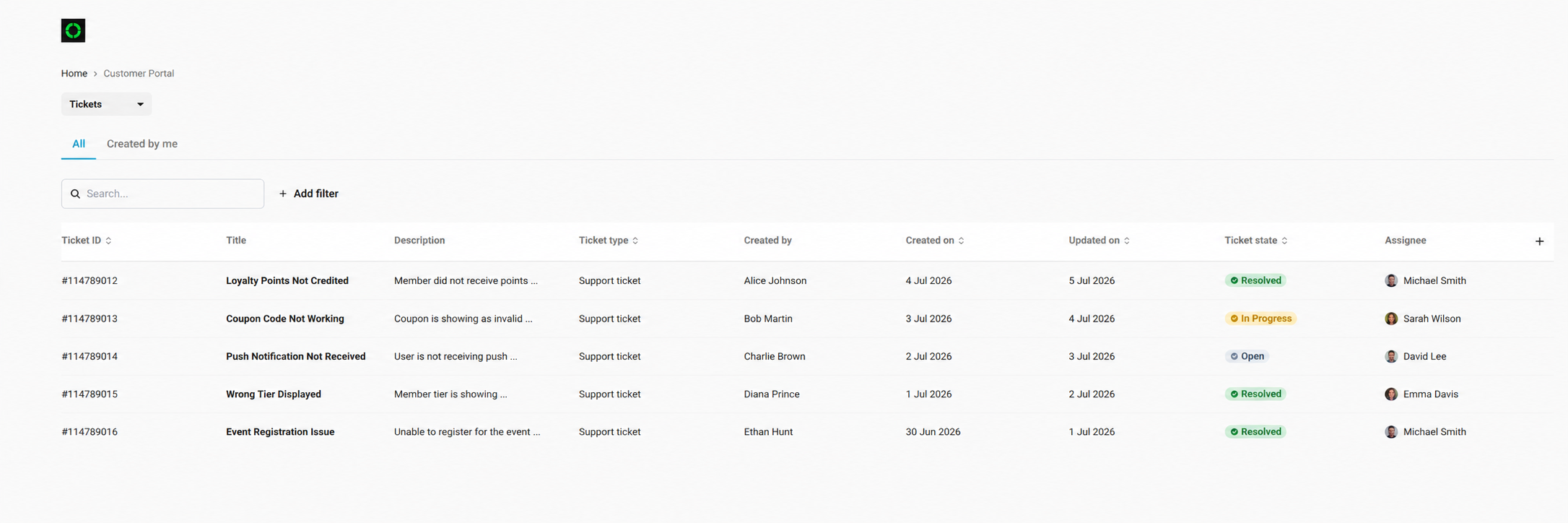
Inside the Company Ticket Portal, you can:
- Use the All tab to view tickets created by users from your company
- Use the Created by me tab to display only your own tickets
- Search for a ticket using its ID or title
- Apply filters to narrow down the results
- View the ticket status, creator, assignee and latest update
- Open a ticket to review its details and communication history
Important Information
The Company Ticket Portal is available only when your user account is assigned to a company.
The portal does not display historical tickets retroactively. Only tickets created after the user has been assigned to the company will be visible to other company users.
Updated 3 months ago