
Klaviyo Other Functions
This Ongoing Management Guide provides the steps required to maintain, troubleshoot, and optimize the Klaviyo native integration within the TRIFFT.
Other functions covered
- Pre-built Loyalty Flows: Welcome, referral invite, and points-expiration journeys.
- Coupon Lists in Emails: Dynamically display current TRIFFT coupons in Klaviyo emails.
- Review Rewards: Reward product or brand reviews using Klaviyo events and TRIFFT APIs.
- Member Activation Campaigns: Build progressive visit or transaction campaigns.
- Wallet Push Notifications: Send point-credit and point-debit updates through the TRIFFT app.
- Custom TRIFFT → Klaviyo Webhooks: Send non-standard events or custom payloads.
- Advanced KDP: Use deeper analytics, data transformation, audience management, and monitoring.
Pre-built loyalty flows
TRIFFT provides branded flow templates that can be copied into Klaviyo and customized. Templates include the trigger, baseline structure, and dynamic loyalty content, but all customer-facing copy and links must be reviewed before launch. Additional flow patterns described in the legacy documentation include reward-redemption reminders, tier-upgrade notifications, points-balance updates, and referral-incentive flows.
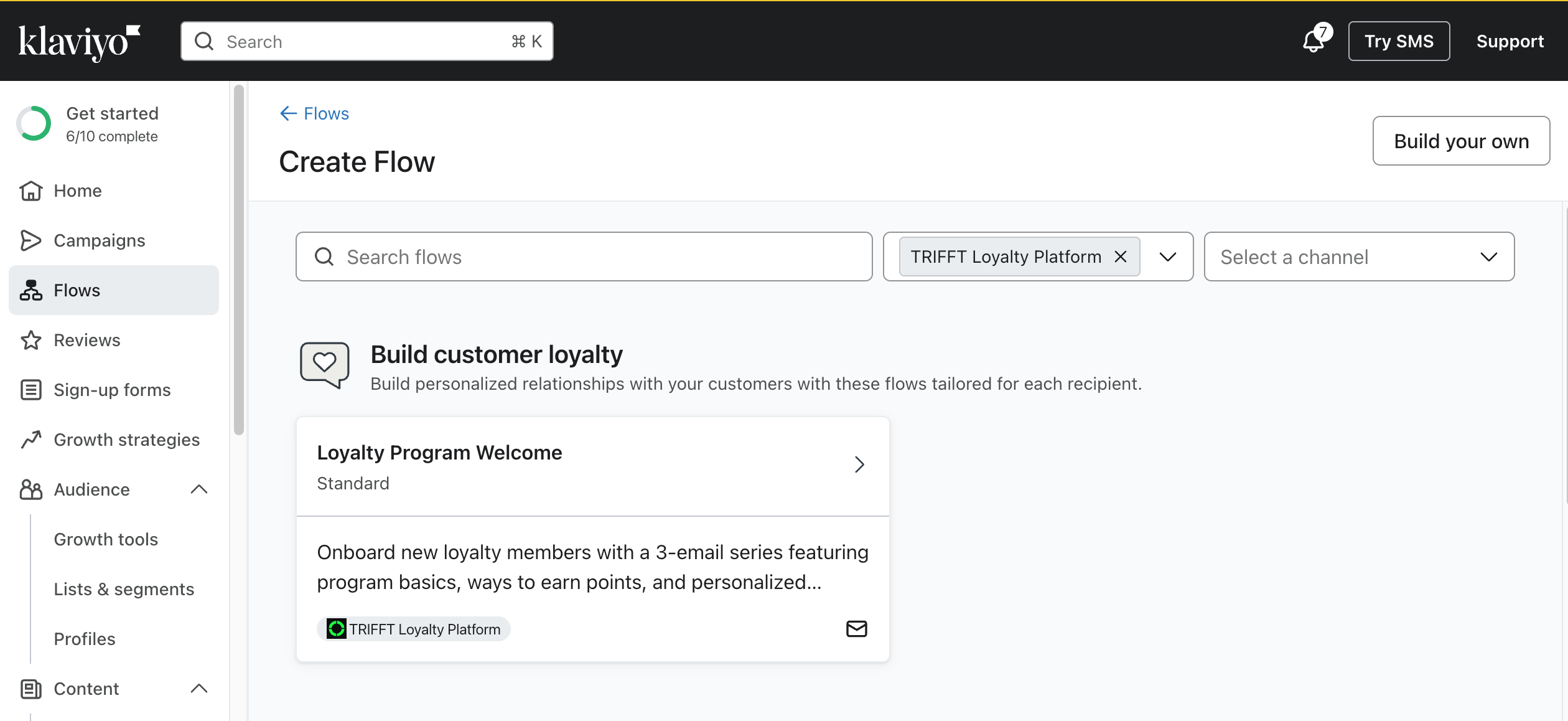
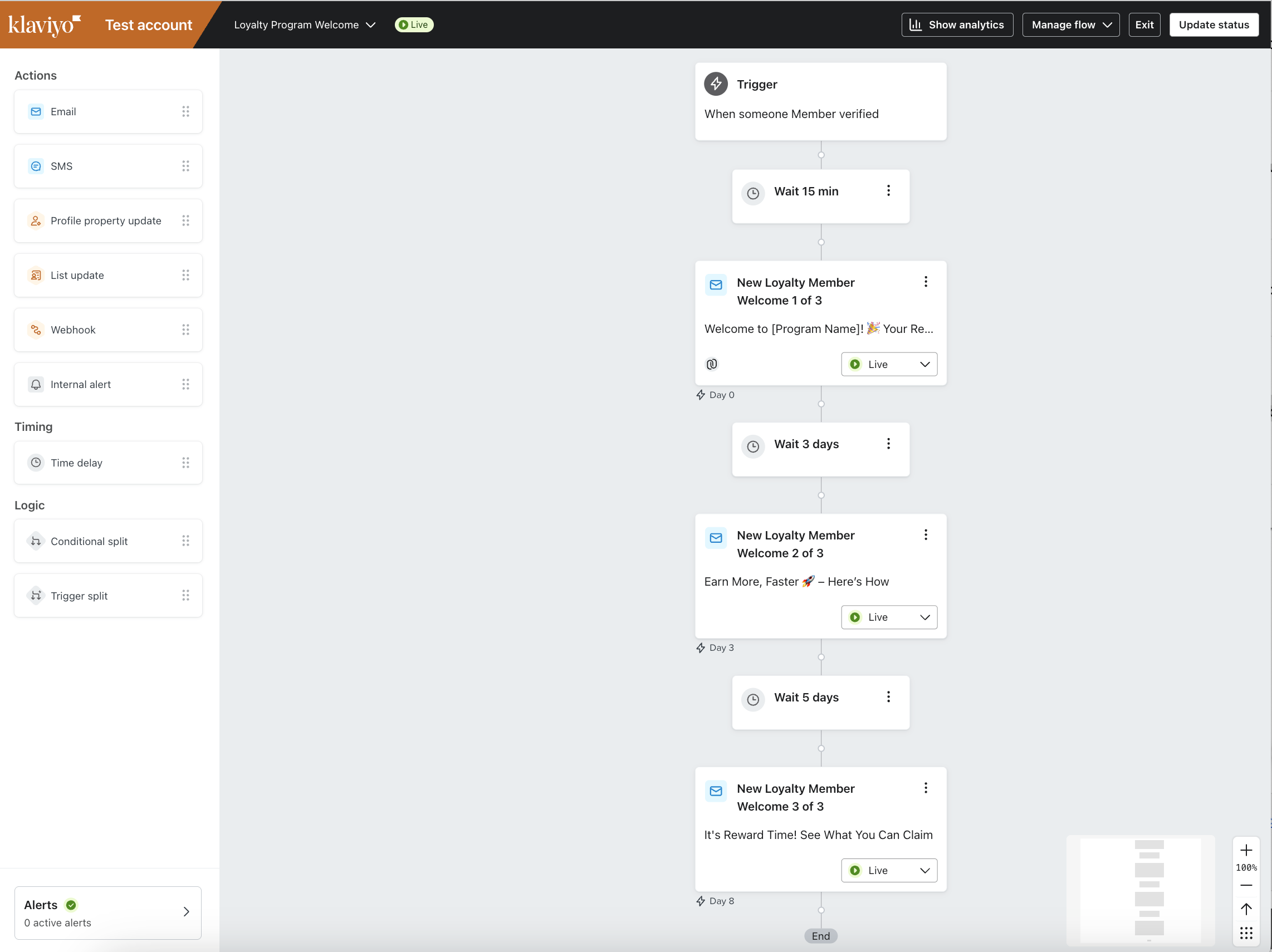
Loyalty Program Welcome Flow
The flow starts when Klaviyo receives the Member verified event.
It contains three messages:
| Step | Purpose | Typical dynamic content |
|---|---|---|
| Email 1: Welcome | Introduce the program and celebrate membership. | Points rules, tier rules, expiration rules, redemption rate, coupon explanation. |
| Email 2: Ways to Earn | Explain how to earn more value. | Purchases, referrals, reviews, social actions, profile completion, preferences. |
| Email 3: Ways to Redeem | Show how rewards can be used. | Current points, current tier, and available coupons. |
Testing options include:
- Add a trigger filter that allows only a test email address.
- Create a verified member through a supported touchpoint.
- Create a verified member through the TRIFFT API with
is_verified: true.
Example request:
curl --request POST \
     --url https://api.trifft.io/v1/member \
     --header 'Authorization: Bearer YOUR_TRIFFT_API_KEY' \
     --header 'accept: application/json' \
     --header 'content-type: application/json' \
     --data '
{
  "language": "en",
  "is_verified": true,
  "params": {
    "firstName": "John",
    "lastName": "Doe"
  },
  "email": "[email protected]"
}
'The template contains generic content. Review program names, links, buttons, point rules, reward examples, and legal text before activation.
How to Install a Flow Template
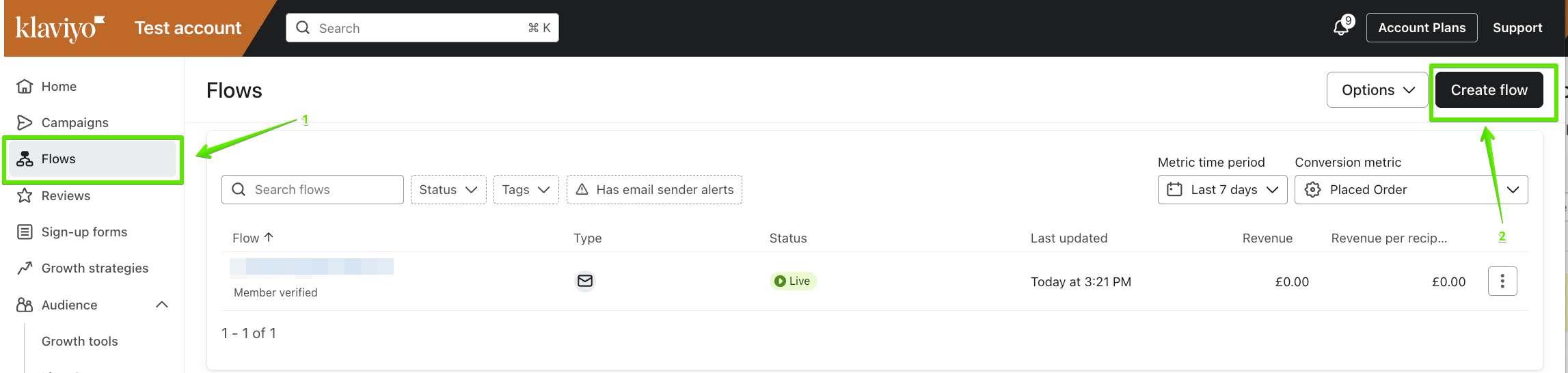
To implement a flow template:
-
Log into your Klaviyo account.
-
Click directly on this link Loyalty Program Welcome or navigate to search for "Loyalty Program Welcome" and use the Create Flow button. This will copy the flow into your account, and you can then customize it to fit your brand and loyalty program.
-
Edit and manage the flow works exactly the same as any other Klaviyo flow.
-
Once you’ve reviewed and customized your flow, refer to Klaviyo’s guide for how to enable and start sending a flow.
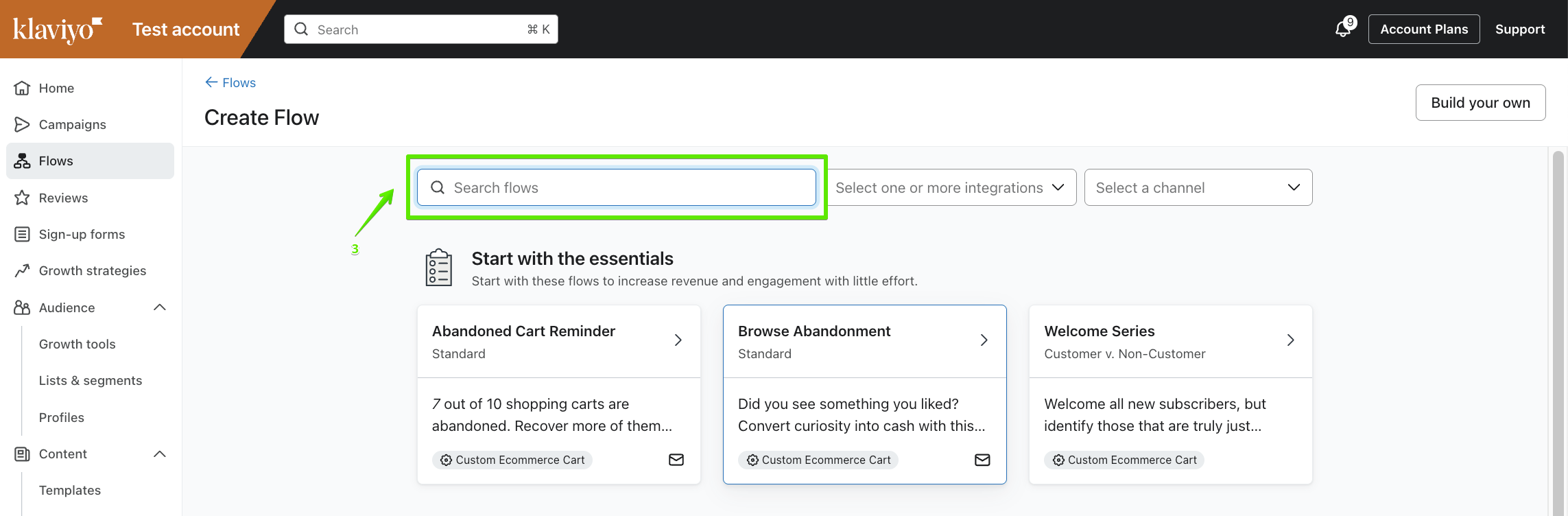
Some of the content in the flow templates is generic and must be updated to reflect your specific loyalty program before it is ready to send to customers. We recommend reviewing all blocks and emails individually (especially buttons and links) before enabling the flow.
Testing the flow
This flow is triggered once "Member verified" event is received by Klaviyo. Verified members are members who registered to the loyalty program and have been verified. How verification happens may depend on a particular loyalty program implementation. For example:
- If TRIFFT is integrated with Shopify, when Shopify customer creates and account
- If TRIFFT is integrated with WooCommerece, after WooCommerce customer registers for loyalty program
- If TRIFFT mobile app or client zone touch points are used, after member verified their primary contact by SMS or Email OTP or by clicking on email confirmation link
Before setting this flow live, test it properly, for example by adding a trigger filter that will launch the flow only for the test email address.
If you don't have e-commerce or TRIFFT touch-point integration ready, use TRIFFT REST API Create a Member to easily create a verified member. Make sure you set "is_verified": true
curl --request POST \
     --url https://api.trifft.io/v1/member \
     --header 'Authorization: Bearer f8f****b2c' \
     --header 'accept: application/json' \
     --header 'content-type: application/json' \
     --data '
{
  "language": "en",
  "is_verified": true,
  "params": {
    "firstName": "John",
    "lastName": "Doe"
  },
  "email": "[email protected]"
}
'
Referral – New Member Reminder Flow
This flow targets the referred contact and encourages them to complete the qualifying action or purchase.
For setting up the Referral Flow in Trifft and obtaining the unique URL with your own referral code, follow the instructions in the article: Creating a Unique Refer-a-Friend URL
| Configuration | Value |
|---|---|
| Trigger | Referral code provided |
| Audience | The invited contact. |
| Exit condition | Stop the sequence after the referral-eligible purchase or successful reward event, such as Referral reward awarded. |
Suggested sequence:
- Day 0 — Invitation Received
Introduce the program and referral benefit. - Day 3 — Reminder and Urgency
Restate the value and remind the recipient to act. - Day 11 — Final Call
Send a final reminder before the referral opportunity ends.
Best practices:
- Personalize the message with referrer data when available.
- Use a mobile-friendly call to action leading directly to registration or purchase.
- Add exit logic so converted users do not receive unnecessary reminders.
- Compare referral conversion and acquisition cost with other channels.
This flow complements the main welcome flow. It specifically targets contacts acquired through referral before they become active purchasing members.
Points Expiration Reminder Flow
What this flow does
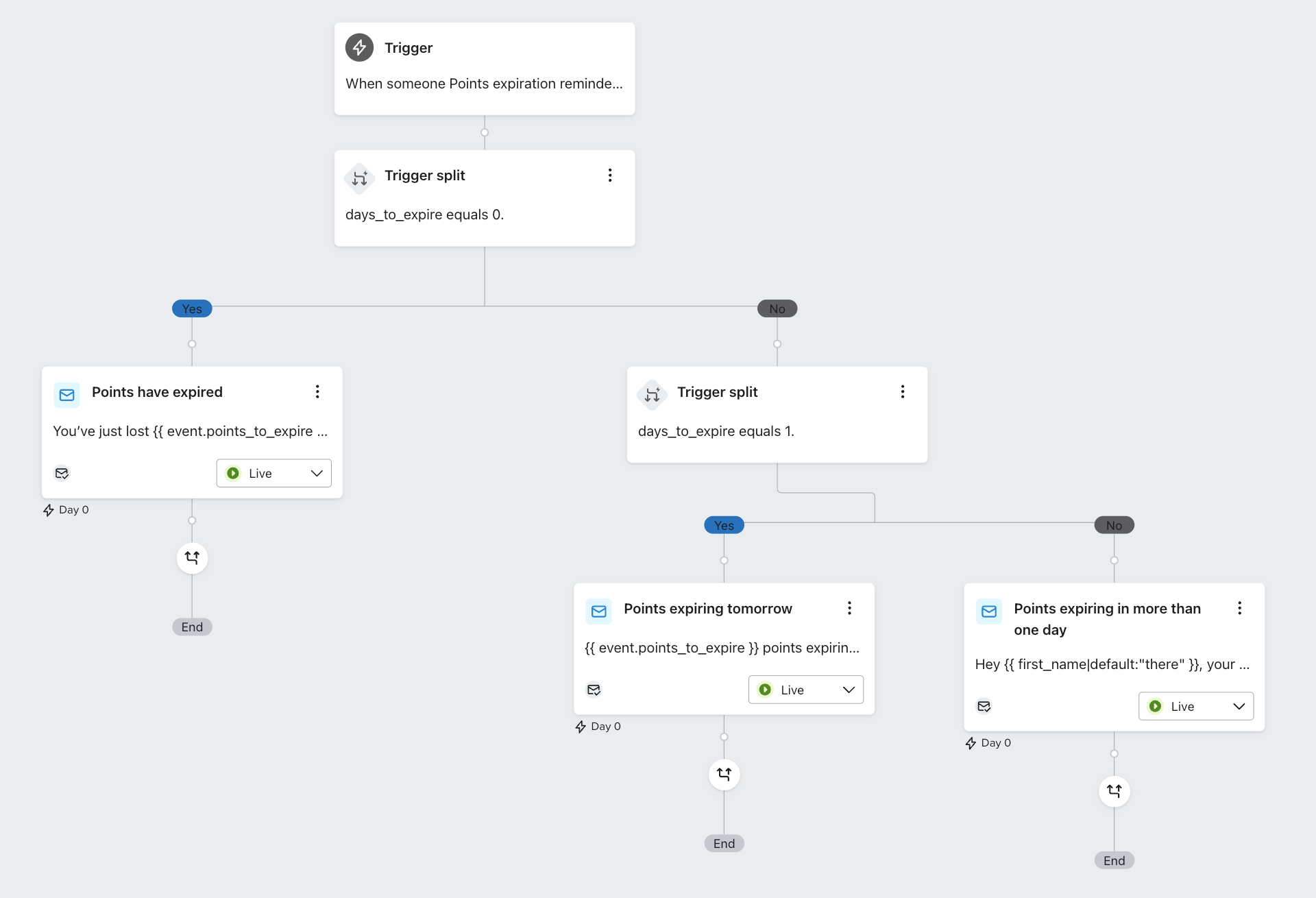
This flow sends automated reminders when a customer has loyalty points nearing expiration. It includes three stages:
| Email Timing | Purpose | Example Subject Line |
|---|---|---|
| 3–30 days | Early warning & gentle nudge | Use your points before they vanish! |
| 1 day | Last call before expiration | Last chance! Points expire tomorrow |
| 0 days | Expired points & re-engagement | You just lost some points 😢 |
Why this matters
Customers often forget to redeem their points. This flow nudges them before it's too late — and even after expiration, helps you re-engage with:
- Personalized subject lines
- Dynamic expiration dates & point counts
- Inline calls to action driving redemption
Setup Instructions
- Ensure the TRIFFT → Klaviyo integration is live.
- In Klaviyo, confirm that the
Points expiration reminder sentmetric is tracked. - Create the Points Expiration Reminder Flow from the Klaviyo Flow Library.
- Customize subject lines, preview text, and email template to fit your brand.
- Activate the flow.
Event Properties Used
The following event properties are passed from TRIFFT to Klaviyo and used for personalization:
| Variable | Description |
|---|---|
points_to_expire | Number of points expiring |
days_to_expire | Days until expiration (0 = expired) |
expiring_at | UNIX timestamp (used for formatted expiration) |
wallet_id | Not used in template, this is the primary wallet ID |
How TRIFFT sends expiration events
TRIFFT sends the wallet_points_expiration event to Klaviyo automatically — but only under the following conditions:
- Point expiration must be enabled on your primary Wallet in TRIFFT Admin
- Points are evaluated daily at 01:00 UTC
- If points are scheduled to expire, the relevant
Points expiration reminder sentevent is sent — but only on the following predefined days:
| Days Before Expiry |
|---|
| 30 days |
| 14 days |
| 3 days |
| 1 day |
| 0 days |
These trigger days will be configurable per project in the future.
Display TRIFFT coupons in Klaviyo emails
The standard integration stores a member's coupon list in the Klaviyo profile property:
trifft_couponsEach coupon object can contain:
- Coupon ID.
- Coupon name.
- Image URL.
- Valid-from date.
- Valid-until date.
- Member-specific expiration date.
- Points required for activation.
Example structure:
[
  {
    "id": "4b5803b8-8f57-48c2-8ab8-05f8405c6387",
    "name": "Rare Beauty $10",
    "img_logo": "https://cdn.trifft.io/files/example.png",
    "valid_from": 1724251806,
    "valid_until": null,
    "expiration_at": null,
    "points": 1500
  }
]
Option 1: Reusable content block
- Use a TRIFFT-provided Klaviyo email template as the starting point.
- Save the coupon section as a reusable content block.
- Insert the block into any campaign or flow email.
- Customize typography, spacing, buttons, and visual style.
Option 2: Custom HTML block
Alternatively, you can directly insert the TRIFFT Coupons List into your email by pasting provided HTML into an HTML Block within your Klaviyo template.
This method is more flexible if you want to heavily customize the visual appearance.
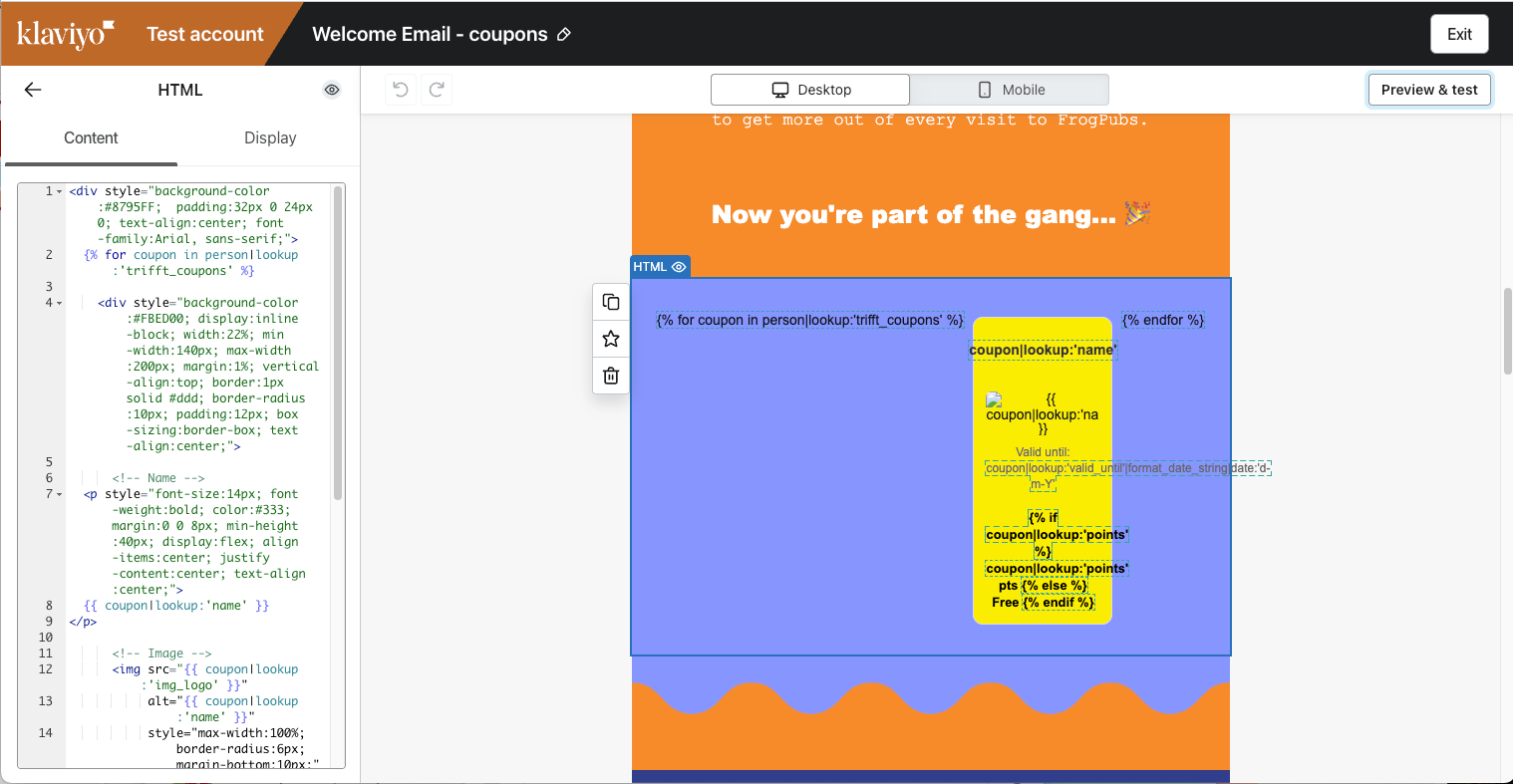
Insert an HTML block into the Klaviyo email and use a loop over trifft_coupons.
<div style="background-color:#8795FF;  padding:32px 0 24px 0; text-align:center; font-family:Arial, sans-serif;">
  {% for coupon in person|lookup:'trifft_coupons' %}

    <div style="background-color:#FBED00; display:inline-block; width:22%; min-width:140px; max-width:200px; margin:1%; vertical-align:top; border:1px solid #ddd; border-radius:10px; padding:12px; box-sizing:border-box; text-align:center;">

      <!-- Name -->
  <p style="font-size:14px; font-weight:bold; color:#333; margin:0 0 8px; min-height:40px; display:flex; align-items:center; justify-content:center; text-align:center;">
  {{ coupon|lookup:'name' }}
</p>

      <!-- Image -->
      <img src="{{ coupon|lookup:'img_logo' }}"
           alt="{{ coupon|lookup:'name' }}"
           style="max-width:100%; border-radius:6px; margin-bottom:10px;">

      <!-- Valid Until -->
      <p style="font-size:12px; color:#666; margin:0 0 6px;">
        Valid until:
        {{ coupon|lookup:'valid_until'|format_date_string|date:'d-m-Y' }}
      </p>

      <!-- Points / Free -->
      <p style="font-size:13px; font-weight:bold; color:#000; margin:0;">
        {% if coupon|lookup:'points' %}
          {{ coupon|lookup:'points' }} pts
        {% else %}
          Free
        {% endif %}
      </p>

    </div>

  {% endfor %}
</div>Configure the block to collapse when
trifft_couponsis empty. Otherwise, members without coupons may see an empty section.
The coupon list is refreshed whenever TRIFFT sends a standard event to Klaviyo, for example after:
- Coupon usage.
- Profile update.
- Transaction completion.
- Another standard loyalty event that refreshes the profile.
Reward product and brand reviews
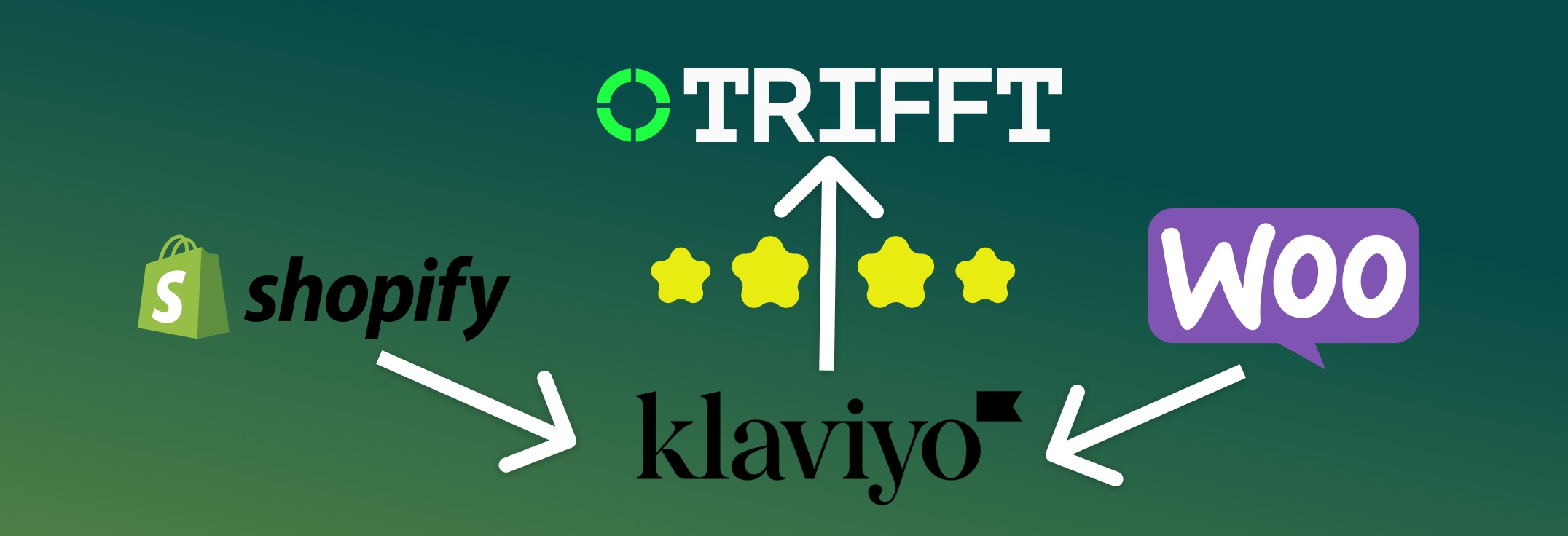
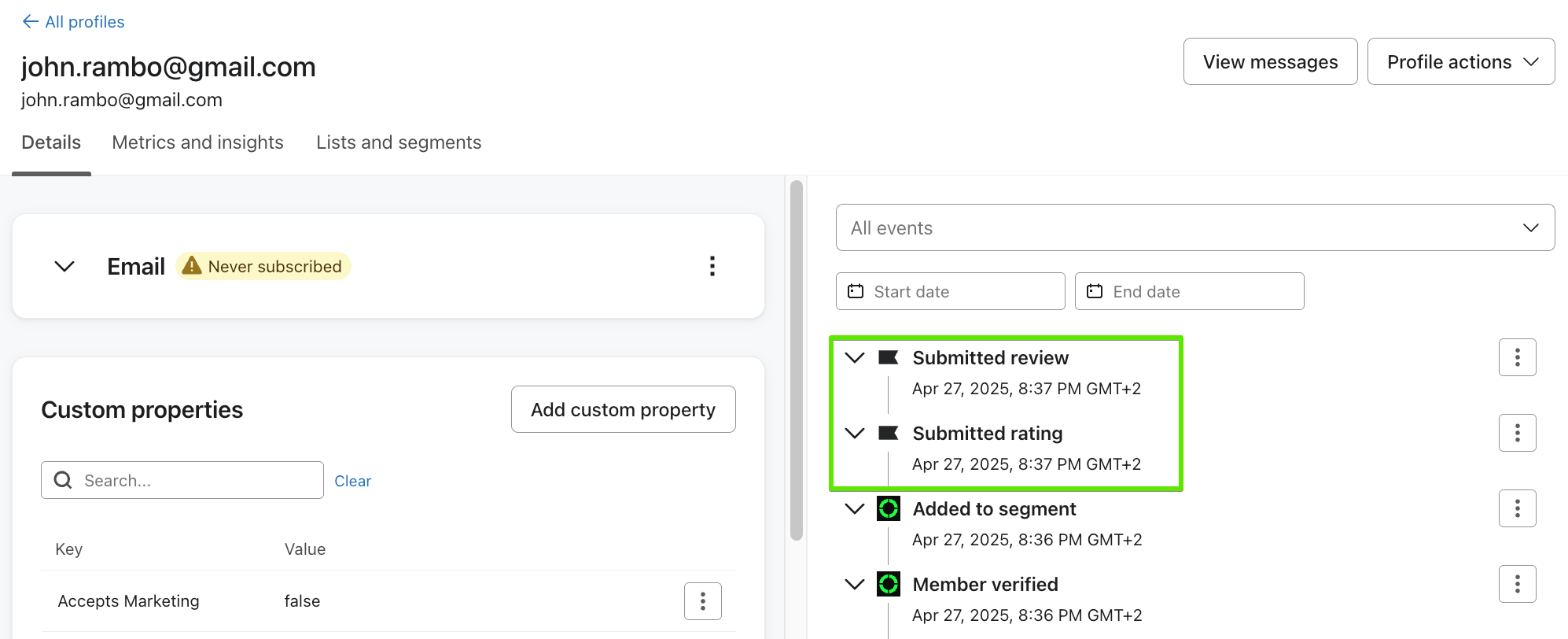
Klaviyo Reviews can collect:
- Submitted Review — Product-level review.
- Submitted Rating — Brand or company-level rating.
These events can trigger a Klaviyo flow that rewards the customer in TRIFFT.
Prerequisites
- Klaviyo Reviews configured for the Shopify or WooCommerce store.
- Active TRIFFT project.
- Working TRIFFT and Klaviyo integration.
- TRIFFT API key for the webhook reward action.
Setup
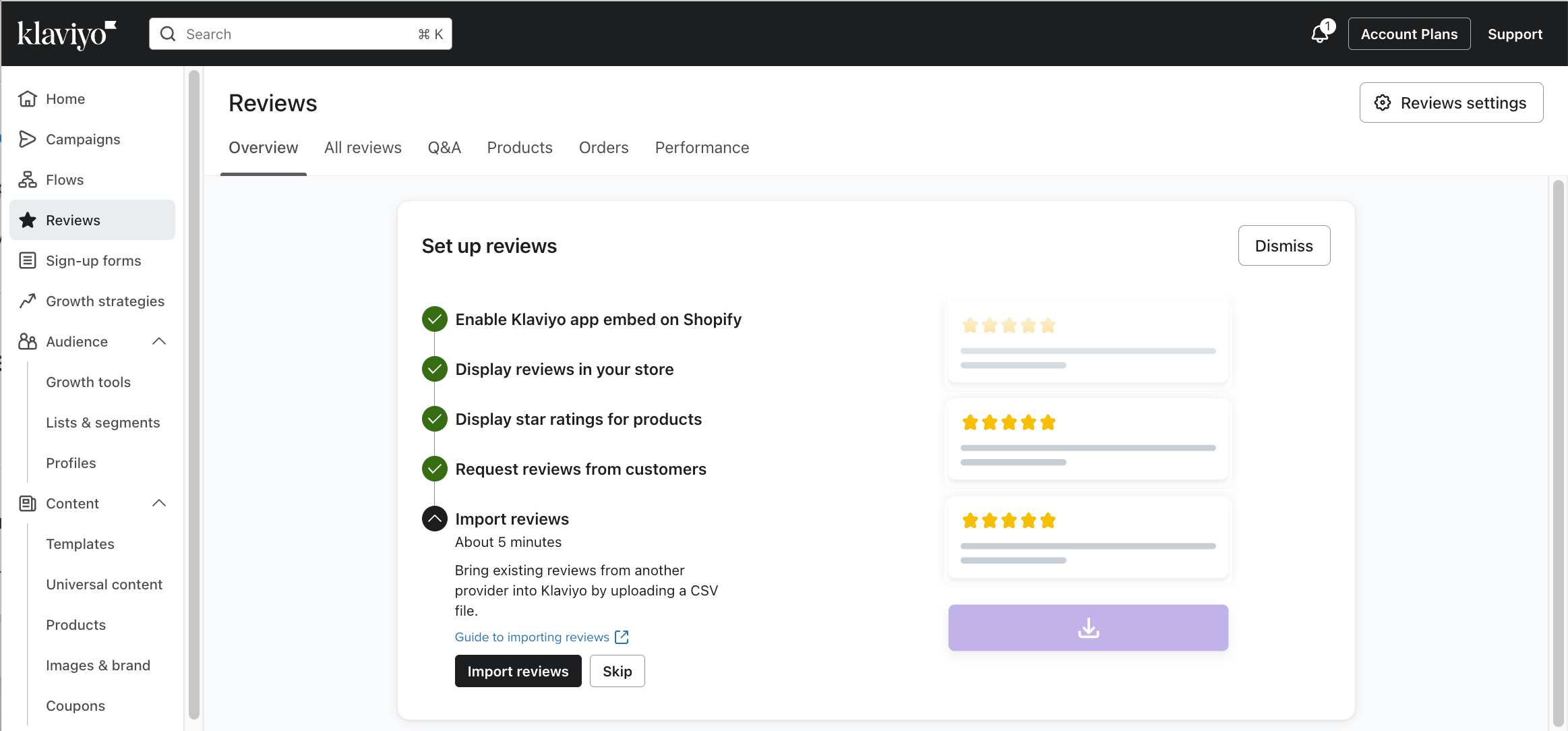
Step 1: Enable Reviews in Klaviyo
Klaviyo supports built-in review collection for both:
- Product-level reviews (e.g. feedback on an individual item)
- Brand-level ratings (e.g. service or delivery satisfaction)
Follow Klaviyo’s documentation to enable this feature.
Step 2: Understand the Review Events
Once enabled, Klaviyo automatically tracks two types of review-related events:
| Event Name | Description |
|---|---|
Submitted Rating | Brand or company-level rating |
Submitted Review | Product-level review |
These events appear on customer profiles and can be used as triggers in Klaviyo flows.
Step 3: Create a Reward Flow in Klaviyo
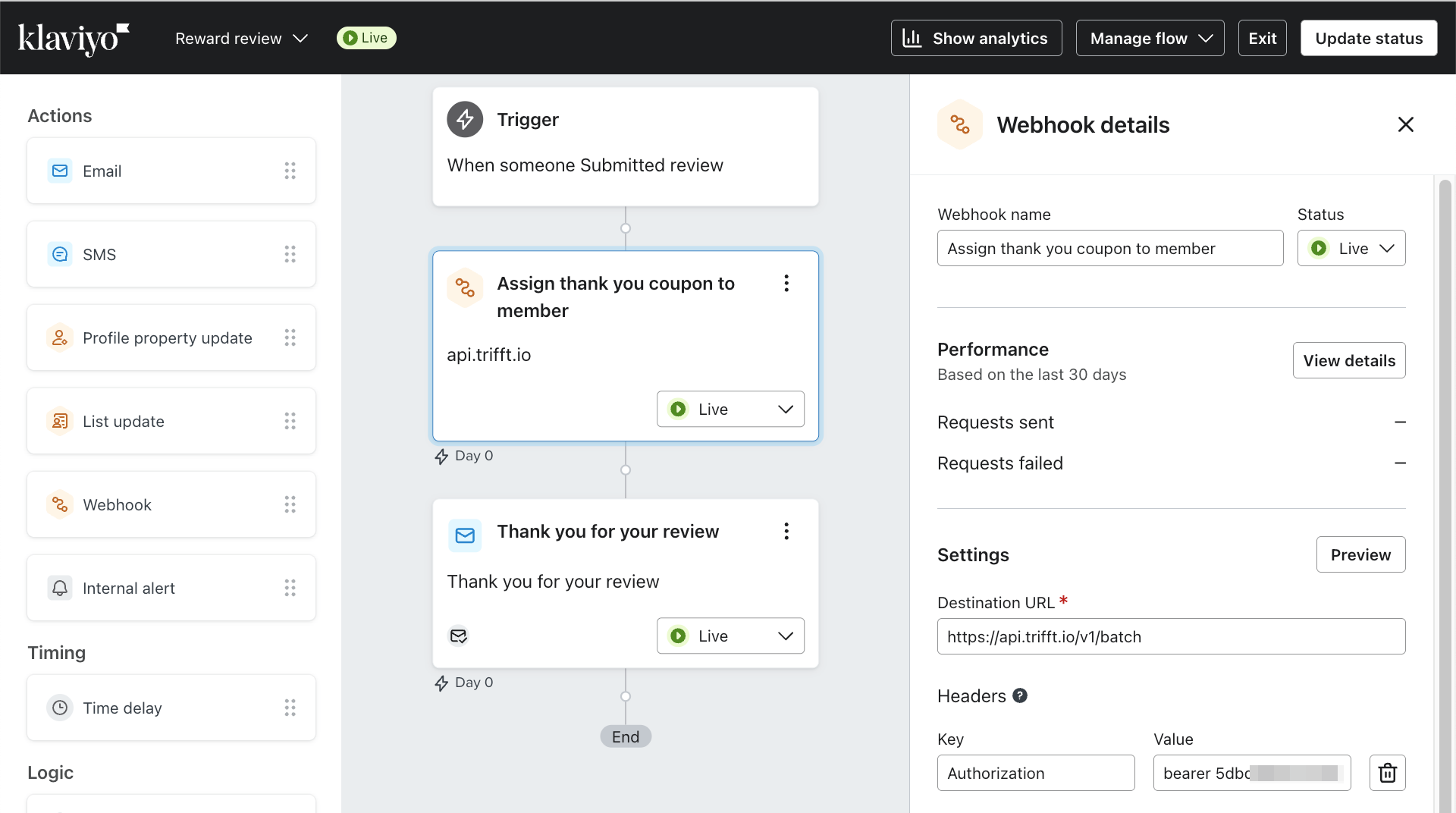
Set up a new Klaviyo flow that rewards customers for leaving a review.
Step 4: Use an Event Trigger
Select either Submitted Review or Submitted Rating as the trigger event.
Step 5: Apply Filters (Optional)
Examples of optional conditions:
- Only reward reviews with a rating above 3
- Limit to one reward per customer per 30 days
- Trigger only for specific product SKUs or categories
Step 6: Add a Webhook to Trigger a TRIFFT Reward
Typical reward would entail either adding points to member account or assigning a coupon.
Use the Webhook action in Klaviyo to trigger a reward in TRIFFT.
Review rewards can increase response rates while keeping collection, automation, segmentation, and loyalty rewards inside Klaviyo and TRIFFT.
Loyalty member activation campaign
A member activation campaign uses transactions or visits to move members through milestones and issue progressively stronger rewards.
Typical architecture
- TRIFFT or the connected commerce/POS system sends transaction data.
- Klaviyo counts qualifying transactions or evaluates campaign conditions.
- A flow webhook calls multiple TRIFFT API actions.
- TRIFFT updates the member's segment, assigns the reward, and sends app communication.
- App widgets or content can reflect the member's current progress.
Example progression:
| Milestone | Example reward |
|---|---|
| Visit 1 | Free starter or low-cost reward. |
| Visit 2 | Free beverage or medium-value reward. |
| Visit 3 | High-value discount or premium reward. |
A single Batch API request can:
- Add the member to the new milestone segment.
- Remove the member from the previous segment.
- Assign the appropriate coupon.
- Send a push notification linked to the coupon.
Best practices:
- Define campaign duration and qualifying spend clearly.
- Use strong in-store and app communication.
- Train staff so the campaign is explained consistently.
- Prevent repeat rewards for the same milestone.
- Track visit frequency, coupon activation, coupon redemption, new-member growth, and campaign ROI.
- Test different reward values and milestone structures.
Example
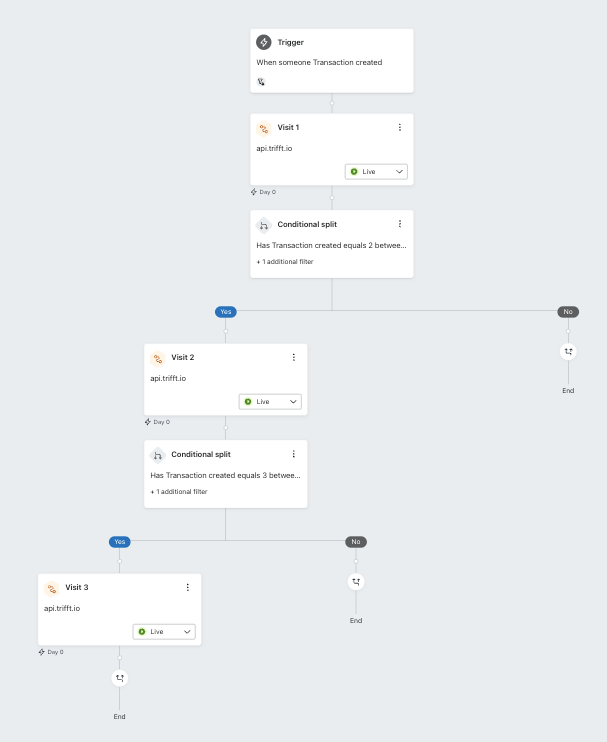
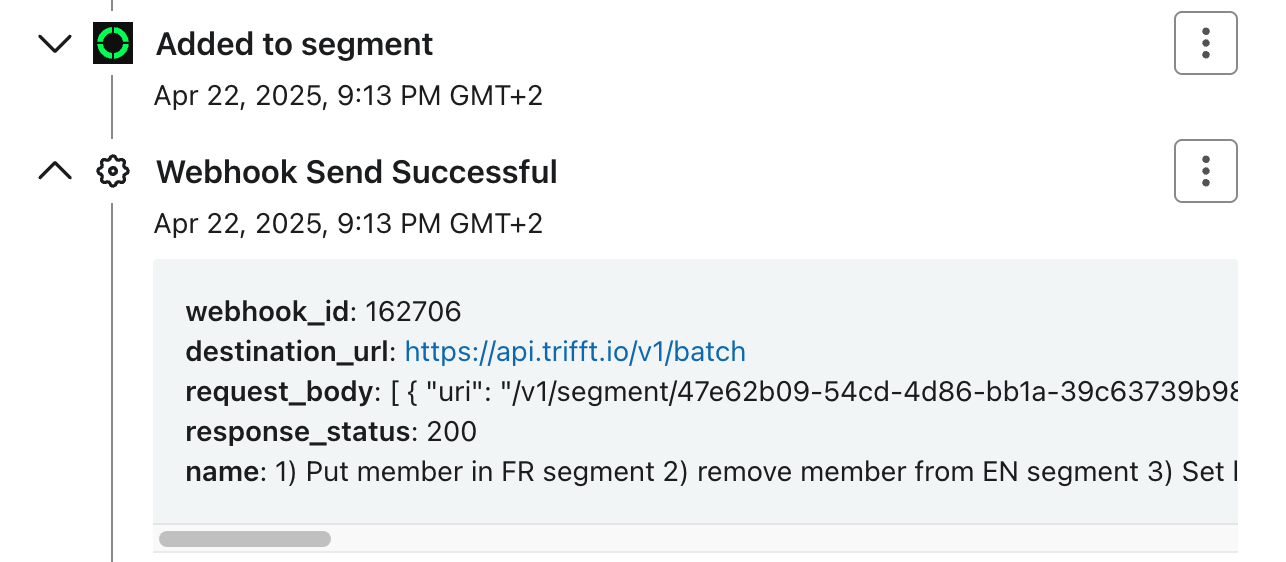
Example Klaviyo flow, excludes email or SMS. Each webhoke node ("Visit 1, Visit 2, Visit 3") calls multiple TRIFFT API endpoints to execute the appropriate actions in TRIFFT, e.g.:
- Add to segment "2 transactions"
- Remove from segment "1 transaction"
- Assign respective reward directly
- Send push notification
Example progression:
- Visit 1: Free appetizer
- Visit 2: Free beverage
- Visit 3: High-value discount
One documented campaign example reported approximately 50% improvement across repeat visits, coupon redemptions, and new members. Treat this as an example rather than a guaranteed benchmark; results depend on reward attractiveness, audience, staff execution, and campaign design.
Send wallet credit and debit app notifications
Use this pattern when members should receive an immediate push or in-app message after points are added or deducted.
Data flow
- A wallet movement occurs in TRIFFT.
- TRIFFT sends Wallet credited or Wallet debited to Klaviyo.
- The relevant Klaviyo flow starts.
- The flow sends a webhook to the TRIFFT messaging endpoint.
- TRIFFT delivers a push notification when the app is in the background and configured in-app content when the app is open.
Requirements
- Deployed TRIFFT mobile app.
- Working TRIFFT and Klaviyo integration.
- Wallet metrics visible in Klaviyo.
- TRIFFT API access for public messages/notifications.
Flow structure
Create two separate flows:
- Flow triggered by Wallet credited.
- Flow triggered by Wallet debited.
A single Klaviyo flow cannot use two different metric triggers as interchangeable entry triggers.
Example notification action:
[
  {
    "uri": "/v1/member/{{ person.id }}/message/notification",
    "method": "POST",
    "payload": {
      "notification": {
        "title": "Points updated",
        "text": "Your loyalty point balance has changed."
      },
      "link": {
        "type": "APP",
        "uri": "wallet"
      },
      "modal": null
    }
  }
]
Testing should confirm:
- The wallet event arrives in Klaviyo.
- The correct flow starts.
- The webhook returns HTTP
2xx. - The correct member receives the message.
- The message format is appropriate when the app is open and closed.
Send custom webhooks from Klaviyo flows
1. Triggering a Flow with an Event from TRIFFT or Another Source
Instead of using webhooks from TRIFFT, Klaviyo flows can be triggered by an event imported from TRIFFT or any other data stream. Ensure that the event data is correctly imported into Klaviyo to initiate automated actions.
2. Configuring the Webhook in Klaviyo
To set up a webhook in Klaviyo:
-
Go to Flows in Klaviyo and open an existing flow or create a new one.
-
Add a Webhook Action to the flow.
-
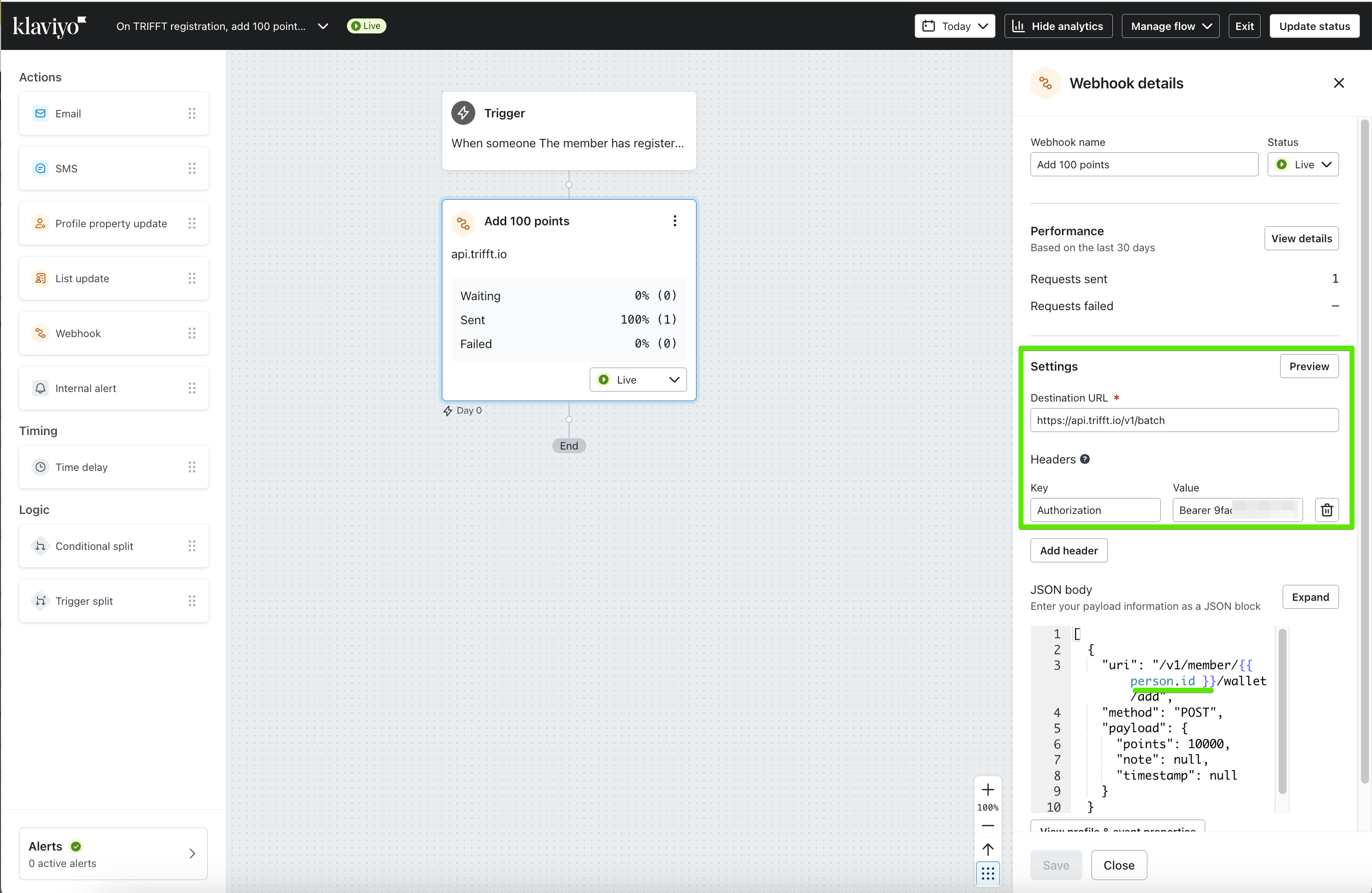
Fill in the webhook details as follows:
- Destination URL:
https://api.trifft.io/v1/batch - Headers:
- Key:
"Authorization" - Value:
"Bearer YOUR_TRIFFT_API_KEY"
- Key:
The
YOUR_TRIFFT_API_KEYis the API key created in TRIFFT. You can find more information on generating API keys in TRIFFT’s Settings - API Keys documentation. - Destination URL:
-
Define the request method as
POSTand configure the payload format as needed.
3) Testing & Validation
To test the webhook setup:
- Open the webhook action in Klaviyo.
- Click Preview.
- Select the right profile, ensuring that the same profile exists in the TRIFFT project.
- Search for the correct profile and click Send Test Request.
- In TRIFFT’s CRM area, look at the member’s event flow to verify that the events are correctly flowing to TRIFFT.
Important Considerations
-
Klaviyo's Webhook URL Limitations:
Klaviyo's webhook implementation does not support entering Jinja variables in the URL. To work around this limitation, TRIFFT offers a Batch API that serves as a wrapper to call any of our APIs without requiring variables in the URL. This approach avoids issues related to URL variable substitution. For more details, refer to TRIFFT's Batch API documentation. -
Variable Notation in Klaviyo:
When using variables in Klaviyo, ensure that there is a space before and after the curly brackets. For example, use{{ person.id }}instead of{{person.id}}. Omitting spaces can cause the variable to not work properly. -
TRIFFT Member ID Notation:
To reference a TRIFFT member ID in Klaviyo, use the notationperson.id.
Example JSON Payloads
Below are examples of JSON payloads for common actions:
| Action | JSON Payload |
|---|---|
| **Assign Coupon to Member** | \[ { "uri": "/v1/member/{{ person.id }}/coupon/61d38741-9b79-4d57-b2a5-da4515b759fc/assign", "method": "POST", "payload": {} } ] |
| **Add 100 Points to Member** | \[ { "uri": "/v1/member/None/wallet/add", "method": "POST", "payload": { "points": 10000, "note": null, "timestamp": null } } ] |
For a comprehensive understanding of TRIFFT's API capabilities, refer to the complete API reference available at https://docs.trifft.io/reference.
For more details on setting up webhooks in Klaviyo flows, refer to Klaviyo’s Understanding webhooks in flows guide.
A custom outbound webhook does not automatically refresh the full standard Klaviyo profile. Include every custom field required by the receiving use case.
Send custom webhooks from TRIFFT to Klaviyo flows
While TRIFFT automatically shares a rich set of metrics and attributes with Klaviyo, there are two situations where you may want to send additional custom data:
When to Use Custom Webhooks
-
Non-standard Events or Profile Updates
If you need to send custom events or modify profile properties that fall outside of TRIFFT's default dataset. -
Payload Manipulation
If you need to adjust the payload before sending it — for example:- Formatting
datetimefields - Adding enriched data from external systems
- Mapping to Klaviyo’s custom structure or naming conventions
- Formatting
These advanced use cases can be handled using TRIFFT’s native webhook system, which supports outbound HTTP calls to Klaviyo’s public API.
Step-by-Step Setup
1. Create a Klaviyo API Key
- Go to your Klaviyo Account Settings → API Keys
- Create a private API key
- Assign
events/writeorprofiles/writescopes depending on your use case
2. Set Up the Webhook in TRIFFT
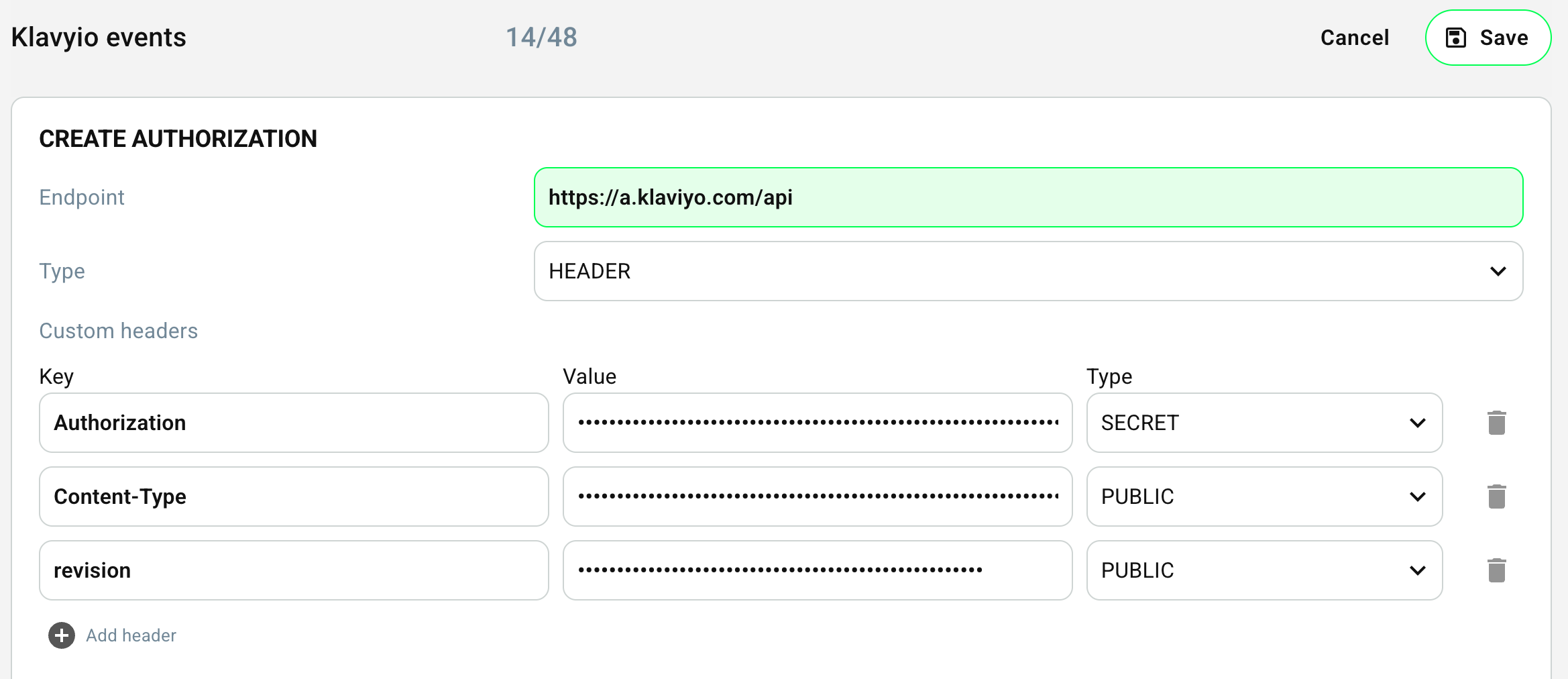
- Go to Settings → Integrations → Webhooks in TRIFFT Admin
- Create a new webhook authorisation and use the following settings:
| Setting | Value |
|---|---|
| Destination URL | https://a.klaviyo.com/api/ or other Klaviyo endpoint |
| Headers | Authorization: Bearer YOUR_KLAVIYO_API_KEY |
3. Configure Webhook
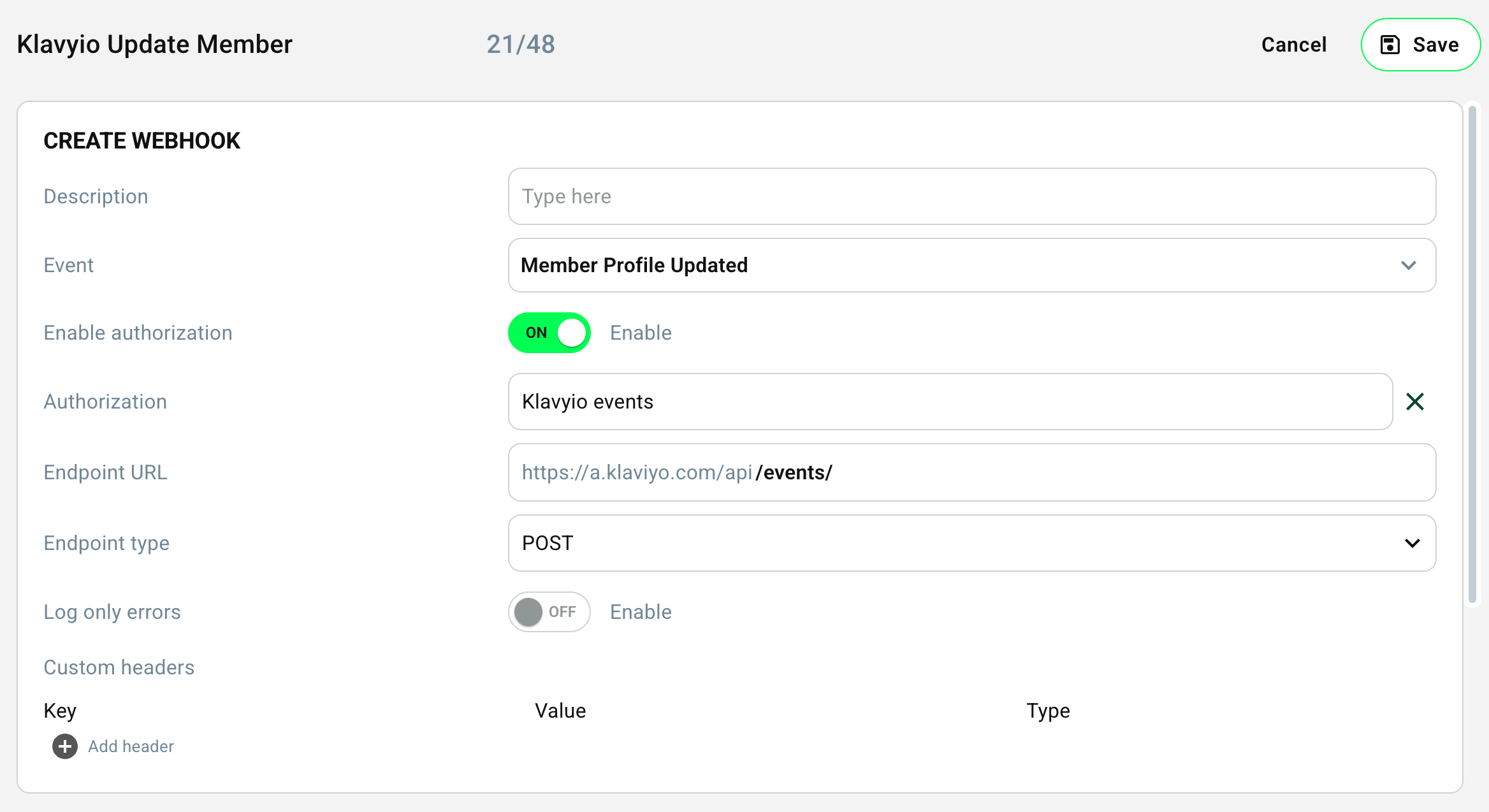
Example payload to send a custom event:
{
  "data": {
    "type": "event",
    "attributes": {
      "time": "{{ event.created_at | date('c') }}",
      "metric": {
        "data": {
          "type": "metric",
          "attributes": {
            "name": "Customer profile updated"
          }
        }
      },
      "profile": {
        "data": {
          "type": "profile",
          "attributes": {
            "email": "{{ member.email }}"
          }
        }
      },
      "properties": {
        "first_name": "{{ member.param.first_name }}",
        "last_name": "{{ member.param.last_name }}",
        "dateOfBirth": "{{ member.param.dateOfBirth }}",
        "card_number": "{{ member.param.card_number }}",
        "language": "{{ member.param.language }}"
      }
    }
  }
}
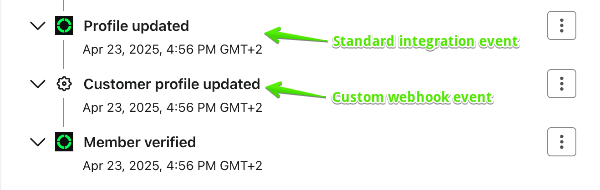
Events created via webhooks will not be "branded" - ie, they will appear in Klaviyo with generic cogwheel icon, not with TRIFFT icon.
TRIFFT webhooks support Twig template engine which is similar to Jinja
Advanced Klaviyo Data Platform functions
Advanced KDP is not required for the standard TRIFFT integration. It is a separate Klaviyo subscription and provides additional analytics and data-management capabilities for teams that need deeper control.
Customer analytics
| Feature | What it does | Loyalty application |
|---|---|---|
| RFM Segmentation | Groups customers by recency, frequency, and monetary value. | Identify at-risk members, loyalists, and audiences that need an incentive. |
| Funnel Analysis | Shows drop-off across multi-step journeys. | Optimize onboarding, coupon activation, and reward redemption. |
| Conversion Overview | Compares conversion across channels. | Evaluate loyalty-incentivized purchases and commercial impact. |
| Audience Performance | Measures how segments convert. | Improve weak audiences and reinforce high-performing segments. |
| Cohort Analysis | Tracks groups of users over time. | Measure long-term retention, purchase, and redemption behavior. |
| Catalog Insights | Analyzes product purchase patterns and combinations. | Trigger replenishment, upsell, or product-specific loyalty offers. |
| Customizable CLV Report | Forecasts customer or segment lifetime value. | Align tiers, points, and reward cost with expected customer value. |
Data management
| Feature | What it does | Loyalty application |
|---|---|---|
| Webhooks | Sends real-time data to third-party systems. | Relay Klaviyo events to TRIFFT or bridge missing integrations. |
| Code Component | Uses code to transform, filter, or enrich data. | Build custom segmentation logic or transform ecommerce metadata. |
| Group Membership API | Exposes audience membership for onsite use. | Show different content by loyalty tier or customer state. |
| Data Warehousing | Ingests data from external or legacy systems. | Create a more complete customer view across online and offline systems. |
| Custom Monitors | Detects anomalies and creates alerts. | Identify coupon-usage drops, suspected fraud, or integration failures. |
Advanced KDP can support:
- More precise targeting.
- Stronger personalization.
- Clearer measurement.
- Smarter automation.
- Proactive issue detection.
Ongoing management checklist
- Review flow triggers, filters, and exit conditions after every campaign change.
- Confirm that reward actions are idempotent or protected against duplicates.
- Audit reusable coupon blocks when coupon properties or email design changes.
- Monitor webhook response codes and Klaviyo execution logs.
- Rotate API keys according to your security policy.
- Validate that member identity remains consistent across TRIFFT, Klaviyo, ecommerce, and POS systems.
- Review points-expiration, tier, and segment logic when loyalty rules change.
- Measure commercial performance rather than relying only on message engagement.
Updated 2 months ago