
Privacy Requests Set Up
Introduction
The Privacy Requests feature enables businesses to efficiently handle customer requests regarding their personal data, ensuring compliance with data privacy regulations such as GDPR. Through the Content Cockpit, administrators can manage requests for data access and data deletion, with options for both automatic and manual processing.
What Are Privacy Requests?
- Data Access Requests: Customers can request a copy of the personal data stored about them.
- Data Deletion Requests: Customers can request the deletion of their personal data from the system.
Key Features
1. Data Access Management
- Request Handling: View and process customer requests for data access.
- Automatic Notifications: The system automatically notifies customers that their request will be addressed within a specified timeframe (e.g., 30 days).
2. Data Deletion Management
- Verification Process: Customers receive an email to confirm their data deletion request.
- Status Tracking: Monitor the status of deletion requests, including verification and processing stages.
3. Compliance Support
- Regulatory Adherence: Assists in maintaining compliance with data protection laws by providing structured processes for handling privacy requests.
How to Manage Data Access Requests
-
Navigate to Members > Privacy Requests
- Access the Privacy Requests section to view a list of customer requests.
-
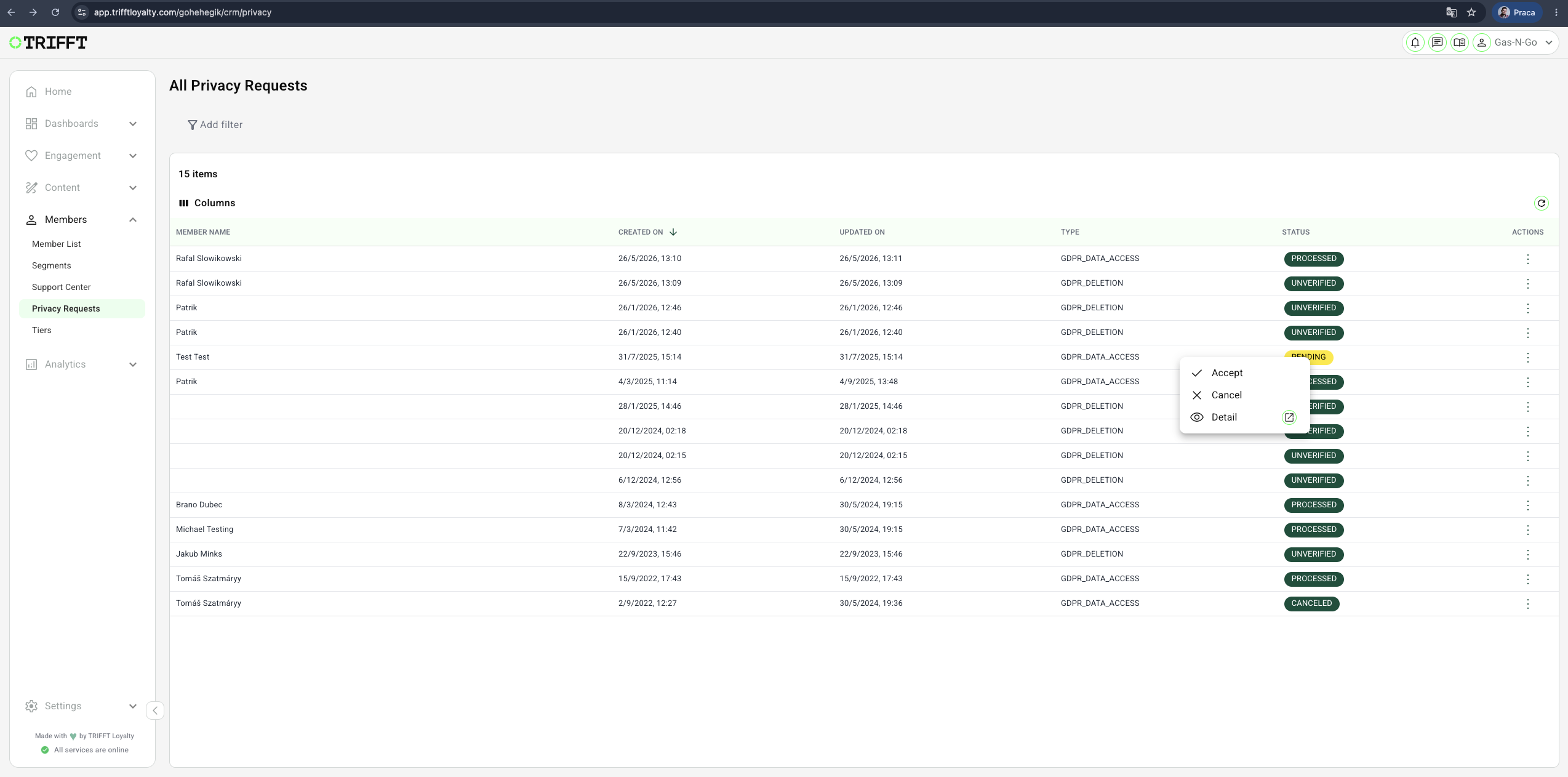
Review Pending Requests
- Requests are listed with a status of Pending until addressed.
- For each request, right-clicking will allow you to:
- View Customer Details: Access information about the requesting customer.
- Accept the Request: Initiate the process to fulfill the data access request.
- Delete the Request: Remove the request from the system if necessary.
-
Processing the Request
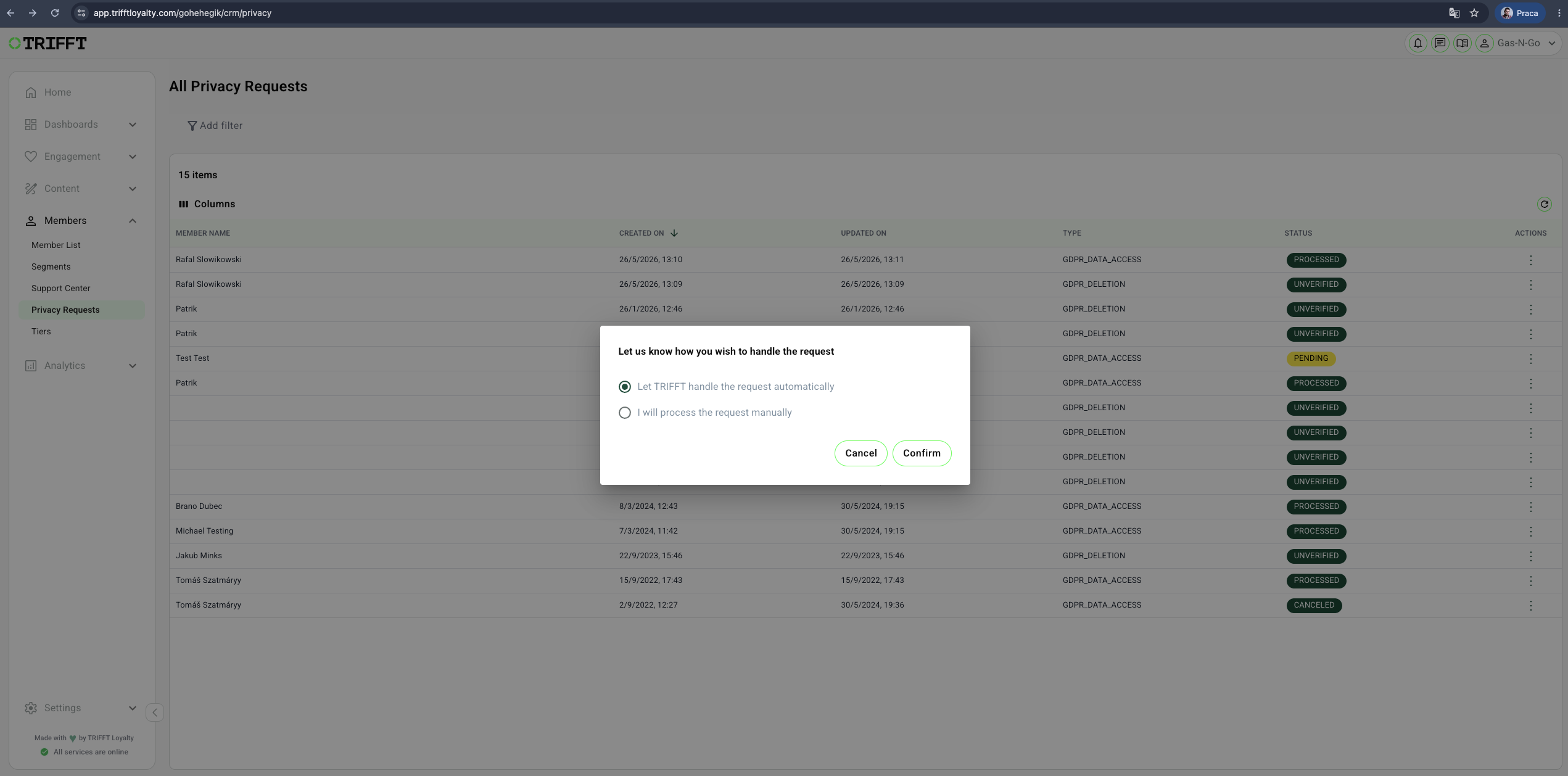
- Upon accepting a request, choose between:
- Automatic Handling: The system processes and fulfills the request automatically.
- Manual Handling: Administrators manually compile and provide the requested data.
- Upon accepting a request, choose between:
-
Completion
- Once fulfilled, the request status updates to Processed, indicating completion.
How to Manage Data Deletion Requests
-
Customer Initiates Request
- The customer requests data deletion through the designated channel (e.g., mobile app).
-
Verification Email Sent
- An automatic email is sent to the customer, containing a link to confirm their deletion request.
-
Monitoring Request Status
- In the Privacy Requests section:
- Unverified Status: Indicates the customer has not yet confirmed the deletion request.
- Processed Status: Indicates the customer has confirmed the request, and data deletion has been executed.
- In the Privacy Requests section:
-
Completion
- Once the customer confirms via the email link, the system processes the deletion, and the request status updates accordingly.
Example Use Case
Scenario: Customer Requests Data Access
A customer wishes to review the personal data a company holds about them.
- The customer submits a data access request through the mobile app.
- The request appears in the Privacy Requests section with a Pending status.
- An administrator reviews the request and chooses to fulfill the request automatically.
- The system processes the request, and the status updates to Processed.
- The customer receives their data, fulfilling the company's obligation under data privacy regulations.
Benefits of Using the Privacy Requests Feature
- Regulatory Compliance: Streamlines adherence to data protection laws by providing structured processes for handling privacy requests.
- Customer Trust: Demonstrates a commitment to data privacy, enhancing customer confidence.
- Efficient Data Management: Centralizes the handling of data access and deletion requests, reducing administrative burden.
By utilizing the Privacy Requests feature, businesses can effectively manage customer data inquiries, ensuring transparency and compliance with privacy regulations.
Configuration checklist
-
Role Restrictions: Only specific high-clearance administrators have permission to execute anonymization.
-
Anonymization Accuracy: Spot-check an anonymized profile in the Support Center to ensure no PII remains in the search indices.
-
Data Export Security: Exported files are handled according to your brand’s secure file transfer protocols.
-
SLA Compliance: Requests are processed within the legal timeframe (e.g., 30 days for GDPR).
Updated 3 months ago